
Mjukvara
Twinkle Tray 1.16.0 Beta 4
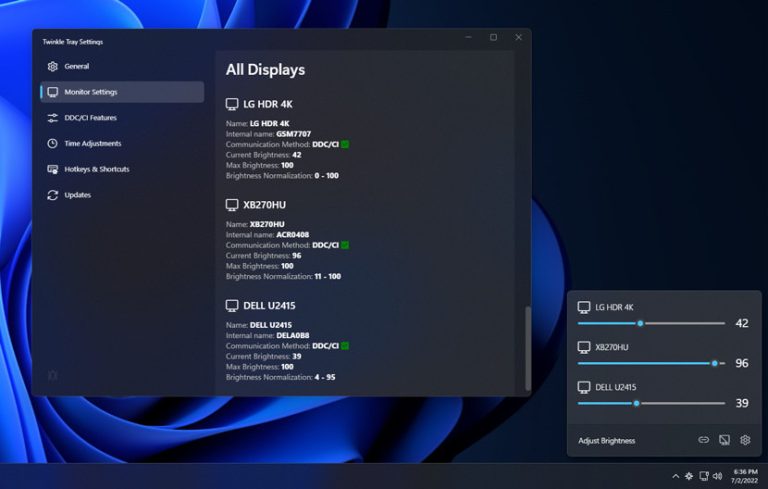
Twinkle Tray lets you easily manage the brightness levels of multiple monitors. Even though Windows is capable of adjusting the backlight on most monitors, it typically doesn't support external monitors. Windows 10 & 11 also lack any ability to manage the brightness of multiple displays. This app inserts a new icon into your system tray, where you can click to have instant access to the brightness levels of all compatible displays.
Design & Personalization
Twinkle Tray will automatically adjust the look and feel to match your Windows version and preferences. Additional options are available to select the Windows version and theme of your choice.

Twinkle Tray features
Twinkle Tray offers a variety of options and features to match your preferences. All of which are 100% free.
- Seamlessly blends in with Windows 10 & Windows 11.
- Works with most laptops and DDC/CI-enabled monitors.
- Bind hotkeys to adjust the brightness of specifically or all displays.
- Control DDC/CI features such as contrast, volume, and power state.
- Supports brightness adjustments by time of day or when idle.
- Supports command line arguments for custom scripting.
- Normalize backlight across different monitors.
- Localized for over 20 languages.
- Starts up with Windows.
Twinkle Tray 1.16.0 Beta 4:
- Redesigned the settings window to better match Windows 11 and account for the new v1.16.0 features.
- Added support for multiple actions per hotkey. Please note that actions set up in earlier beta version will need to be manually recreated in this beta. If you're upgrading from v1.15.4 then your existing hotkeys will be migrated.
- Added a configurable cap when linking a DDC/CI feature to brightness. For example, you can set contrast to increase up until 50% and then stay the same for all brightness values after 50%.
- Added an option to control the default aggressiveness of the hotkey overlay showing over apps. Changing this isn't recommended, but is available for troubleshooting.
- Replaced "disable overlay" Troubleshooting option with a new "Default overlay behavior" option.
- Improved compatibility with large numbers of connected DDC/CI-enabled displays.
- Fixed min/max feature values not being used.
Please see the v1.16.0-beta1 release notes for important information about this update.
Download: Twinkle Tray 1.16.0 Beta 4 | 69.3 MB (Open Source)
Links: Twinkle Tray Website | Twinkle Tray @Microsoft Store
 Get alerted to all of our Software updates on Twitter at @NeowinSoftware