
Mjukvara
Windows Firewall Control 6.9.9.9
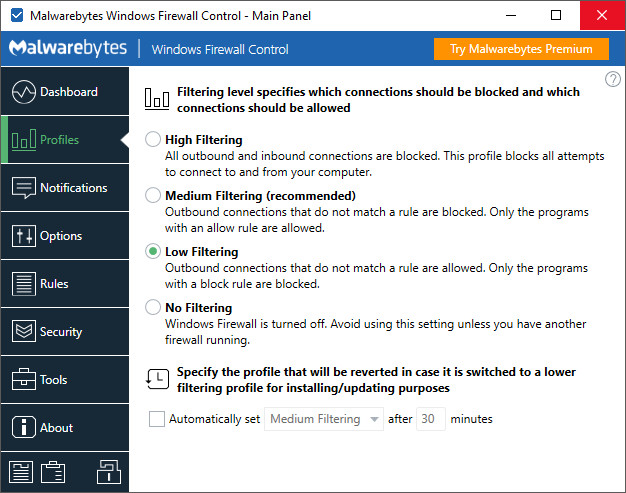
Windows Firewall Control is a nifty little application which extends the functionality of the Windows Firewall and provides quick access to the most frequent options of Windows Firewall. It runs in the system tray and allows user to control the native firewall easily without having to waste time by navigating to the specific part of the firewall. This is the best tool to manage the native firewall from Windows 11, 10, 8.1, 8, 7, Server 2022, 2019, 2016, 2012.
Malwarebytes acquired Windows Firewall Control in June of 2018. Binisoft Windows Firewall Control will quickly integrate into the Malwarebytes platform, which simplifies the deployment and ongoing management of security solutions. Following the acquisition, the full-featured edition of Windows Firewall Control has been re-released at absolutely no cost (the notifications system is now available for free and the program does not require activation anymore).
Windows Firewall Control offers four filtering modes which can be switched with just a mouse click:
High Filtering - All outgoing connections are blocked. This setting blocks all attempts to connect to and from your computer.
Medium Filtering - Outgoing connections that do not match a rule are blocked. Only programs you allow can initiate outgoing connections.
Low Filtering - Outgoing connections that do not match a rule are allowed. You can block the programs you do not want to initiate outgoing connections.
No Filtering - Windows Firewall is turned off. Avoid using this setting unless you have another firewall running on your computer.
Program Features:
- Intuitive and easy accessible interface in the system tray, next to the system clock.
- Full support with standard user accounts. Elevated privileges are required only at installation.
- Disable the ability of other programs to add Windows Firewall rules.
- Multiple and easier ways of creating new rules in Windows Firewall.
- Integrated support of creating, modifying and deleting Window Firewall rules.
- Lock feature which can disable the access to the settings of the program and Windows Firewall.
- Shell integration into the right click context menu of the executable files.
- Display invalid rules with the possibility to delete them very quickly.
- Merge multiple similar rules or duplicate existing ones.
- Search for executable files through folders and create new rules in seconds.
- View recently allowed and blocked connections and create new rules from the Security log.
- Choose if you want the program to start at user log on.
- Import, export and restore all firewall rules or just the selected rules.
- Protection to unauthorized uninstallation.
- Possibility to restore previous settings at uninstallation.
- Global hot keys are supported and various shortcut keys are available.
- And many, many more. Just try it out.
Other specific features:
- Notifications System which provides notifications for outbound blocked connections. Four modes available:
- High - Display notifications for all outgoing connections that were blocked, including System and svchost.exe.
- Medium - Display notifications only for regular programs, without notifications for System and svchost.exe.
- Low - Automatically allow digitally signed programs. Notifications are displayed only for unsigned programs.
- Disabled - Notifications are disabled.
- Create temporary rules which are automatically deleted when they expire or on program restart.
Windows Firewall Control 6.9.9.8 changelog:
- New: Added detection of invalid Windows Store rules. If a package is not found on the machine the rule will appear with red text in Rules Panel.
- Updated: The logic from previous version which detects the friendly name for Description property was reverted so that at least one column in Rules Panel contains the version of the package.
Windows Firewall Control 6.9.9.9 fixes:
- Fixed: Certain Windows Store firewall rules may show as invalid in Rules Panel when they are still valid.
- Improved: Notifications exceptions list is now sorted for uppercase entries first and then the others.
Download: Windows Firewall Control 6.9.9.9 | 3.4 MB (Freeware)
View: Windows Firewall Control Website
 Get alerted to all of our Software updates on Twitter at @NeowinSoftware