
Mjukvara
Minimal PDF Compress 1.2

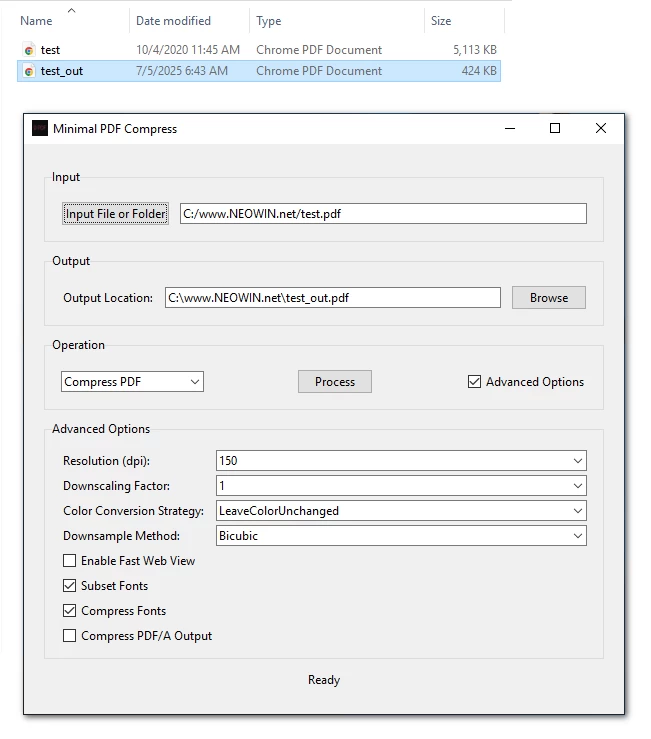
Minimal PDF Compress is a user-friendly, graphical desktop application designed to simplify PDF compression and conversion tasks using Ghostscript on Windows. It allows users to compress PDF files or convert them to PDF/A format with customizable options, all through an intuitive GUI (Graphical User Interface). Built with Python and Tkinter, this tool eliminates the need for command-line interactions, making PDF processing accessible to everyone.
For many users, the command prompt can be intimidating due to its text-based nature, complex syntax, and lack of immediate feedback. Ghostscript, while powerful, typically requires command-line expertise to perform tasks like PDF compression or conversion to PDF/A.
Note: Ghostscript's pdfwrite device doesn't technically "compress" PDFs in the traditional sense. Instead, it recreates a new PDF that may be smaller due to optimizations like removing unnecessary metadata, simplifying fonts, or recompressing images.
Minimal PDF Compress 1.1.0 changelog:
- The main "Operation" dropdown now includes quality presets (Screen, Ebook, Printer, Prepress) for easy control over the size vs. quality trade-off.
- The application interface no longer locks up during processing, by introducing background threading.
- The 60-second timeout has been removed, allowing for the processing of very large files and extensive batch jobs without interruption.
- Fixed a bug where the gswin64c.exe process could remain open after the application was closed.
- The app now prioritizes a local, portable Ghostscript installation (in bin and lib folders) before searching for a system-wide installation.
- An animated progress bar provides clear visual feedback that a task is running.
Minimal PDF Compress 1.2 changelog:
This version now combines two different methods for maximum file size reduction.
- The initial stage cleans and optimizes the PDF by downsampling images and subsetting fonts, just like before.
- A new, optional second stage has been added (option added to use traditional compression). It rebuilds the PDF structure using modern techniques like object streams to reduce file size even further.
Updates
- New theme: https://github.com/deminimis/tkinter_minimal_styles
Bug fixes
- High-DPI display support has been added.
- Fixed a crash that occurred when starting a process due to an incorrect parameter being passed to the Ghostscript command builder.
Installation
- Download the prebuilt Minimal PDF Compress.exe using the link below.
- Double-click the file to open the app — no setup required.
- If Ghostscript isn’t installed yet, the app will prompt you to get it.
What You’ll Need
- Ghostscript is required for the app to work. If you don’t have it, just download and install it from the official Ghostscript website.
Download: Minimal PDF Compress 1.2 | 34.1 MB (Open Source)
View: Minimal PDF Compress Home Page | Screenshot
Get alerted to all of our Software updates on Twitter at @NeowinSoftware