
Mjukvara
HopToDesk 1.44.2

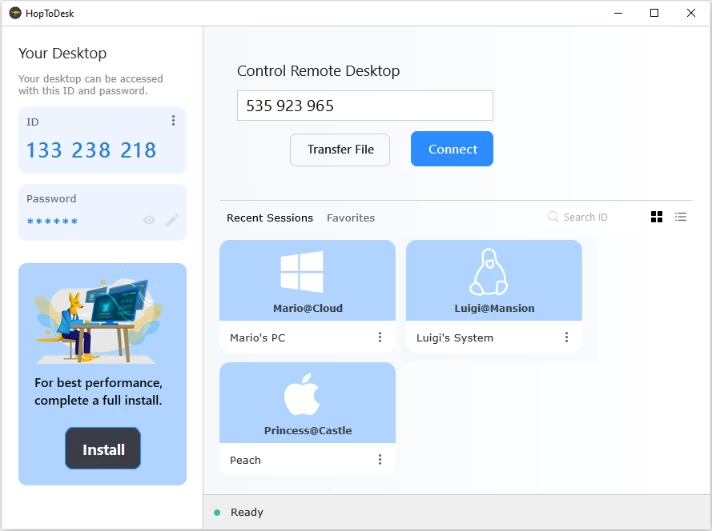
HopToDesk aims to improve the user experience by providing a free, easy-to-use, and secure remote desktop solution for all major device types including Windows PC, Mac, Linux, Android, Chrome Books, iOS, and even Raspberry Pi devices.
HopToDesk empowers you to connect, control, and collaborate with ease. Whether you're providing IT support, managing remote teams, or accessing your own devices from anywhere, HopToDesk offers a reliable and secure solution.
HopToDesk does not and cannot monitor user activity as the application uses end-to-end encryption for all traffic, and does not make a distinction between personal and business use (both are allowed). Additionally, HopToDesk includes many of the main features of common remote desktop solutions such as Unattended Access, File Transfer, Live Chat, Wake-On-LAN, 2FA, Direct IP access, a Recent Session and Favorite list, and is available in over 20 languages.
HopToDesk can run in portable mode or installed on desktop operating systems. Installation is optional, and will install the HopToDesk service which runs in the background and listens for incoming connections, allowing the device to be accessible at all times.
Why Choose HopToDesk?
- Completely Free: Enjoy full access for both personal and commercial use—no hidden fees or limitations.
- End-to-End Encryption: All communications, including screen sharing, file transfers, and chats, are protected with robust encryption.
- Open Source: Contribute to and benefit from a transparent and community-driven project.
- No Account Required: Connect instantly without the need for sign-ups or subscriptions.
Core Features
- Remote Control & Screen Sharing: Effortlessly access and manage remote devices.
- File Transfer: Securely send and receive files with drag-and-drop simplicity.
- Live Chat: Communicate in real-time during sessions.
- Multi-Monitor Support: Navigate multiple screens with ease.
- Clipboard Synchronization: Copy and paste seamlessly across devices.
- Wake-on-LAN: Power on remote systems remotely.
- Session Recording: Document sessions for future reference.
- Two-Factor Authentication: Enhance security with an additional verification layer.
- Custom Branding: Personalize your remote sessions with custom avatars.
- Unattended Access: Connect to devices without requiring user intervention.
- Network Customization: Adjust settings like TURN relays and signaling servers to suit your environment.
Centralized Device Management
Utilize the HopToDesk Dashboard to:
- Monitor device status in real-time.
- Generate invite links for easy device integration.
- Customize network settings and synchronize changes effortlessly.
- Add a personal touch with custom avatars displayed during remote sessions.
Download: HopToDesk 64-bit | 8.2 MB (Open Source)
Download: HopToDesk 32-bit | 7.0 MB
Link: HopToDesk Home Page | Screenshot
Get alerted to all of our Software updates on Twitter at @NeowinSoftware