
Mjukvara
Defender Control 2.0
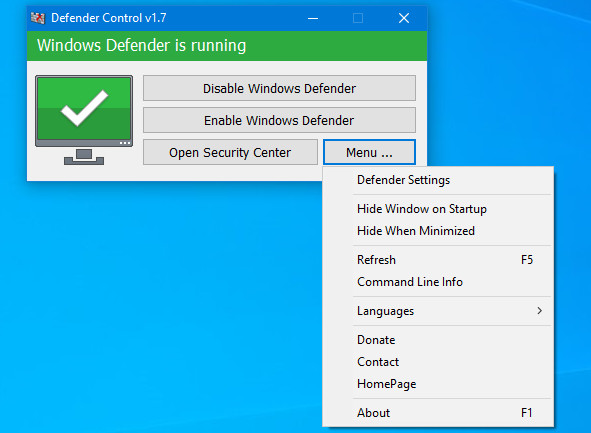
Since Vista, Windows Defender is included with Windows . But… if you are already running something that provides great anti-malware protection, Windows Defender will probably wasting precious resources , there’s no need to have more than one application running at a time.
The problem with all Defender versions in Windows Vista and above is it’s integrated into the operating system and installs by default with no visible or hidden option to uninstall. Many people are looking for ways to disable or remove it from their system as they prefer to use other software , for example on Windows 8 and 10 you cannot turn off Windows Defender completely anymore.
You can turn the program’s real-time protection off temporarily, but if it’s off for a while Windows will turn it back on automatically. It is unclear why Microsoft made the decision to change the behavior of Windows Defender in this regard. What is certain however is that it will annoy users who want to disable it permanently on the computer they are working on.
Defender Control is a small Portable freeware which will allow you to completely disable Windows Defender in Windows 11 , Windows 10 , Windows 8.1 , Windows 8 , Windows 7 , Windows Vista (32 and 64-bit).
Why should you use it:
- During copying big data from Pc to Usb or vice versa , disabling Windows Defender can decrease the total copy time
- Users may experiencing conflicts between Defender and their antivirus application
- Some antivirus programs ask the user to manually turn off or disable Windows Defender in Windows 10
- If you’ve got it enabled, chances are Windows Defender will start each time you boot your PC . If you’re short on resources, have your own methods of dealing with spyware or have simply come to the conclusion that Windows Defender is not for you then you might want to disable it.
Defender Control 2.0 changelog:
- [Removed] – Cmd parameter support (Defender control is using inside some malware)
- [Fixed] – Defender Control Doesn’t work on Windows 11
- [Fixed] – Error occurs when turning off Windows Defender
- [Added] – Some code improvements
Download page: Defender Control 2.0 | 445 KB (Freeware)
View: Defender Control Home Page
 Get alerted to all of our Software updates on Twitter at @NeowinSoftware