PNY Technologies is well known in the computing industry for its NVIDIA-based graphics cards, but the company also participates in the DRAM and flash-based storage products markets. In the latter, PNY markets a range of USB flash drives, SD cards, and portable SSDs under variations of the ‘Elite’ tag.
The company launched two new palm-sized portable SSDs earlier this year – the Pro Elite V2 USB 3.2 Gen 2 in the 10 Gbps class, and the EliteX-PRO USB 3.2 Gen 2×2 in the 20 Gbps class. Both products are based on Phison’s native USB flash drive (UFD) controllers. Both products come with a Type-C interface. While the Pro Elite V2 is available only in the 500 GB and 1 TB capacity points, the EliteX-PRO has four SKUs with capacities ranging from 500 GB to 4 TB.
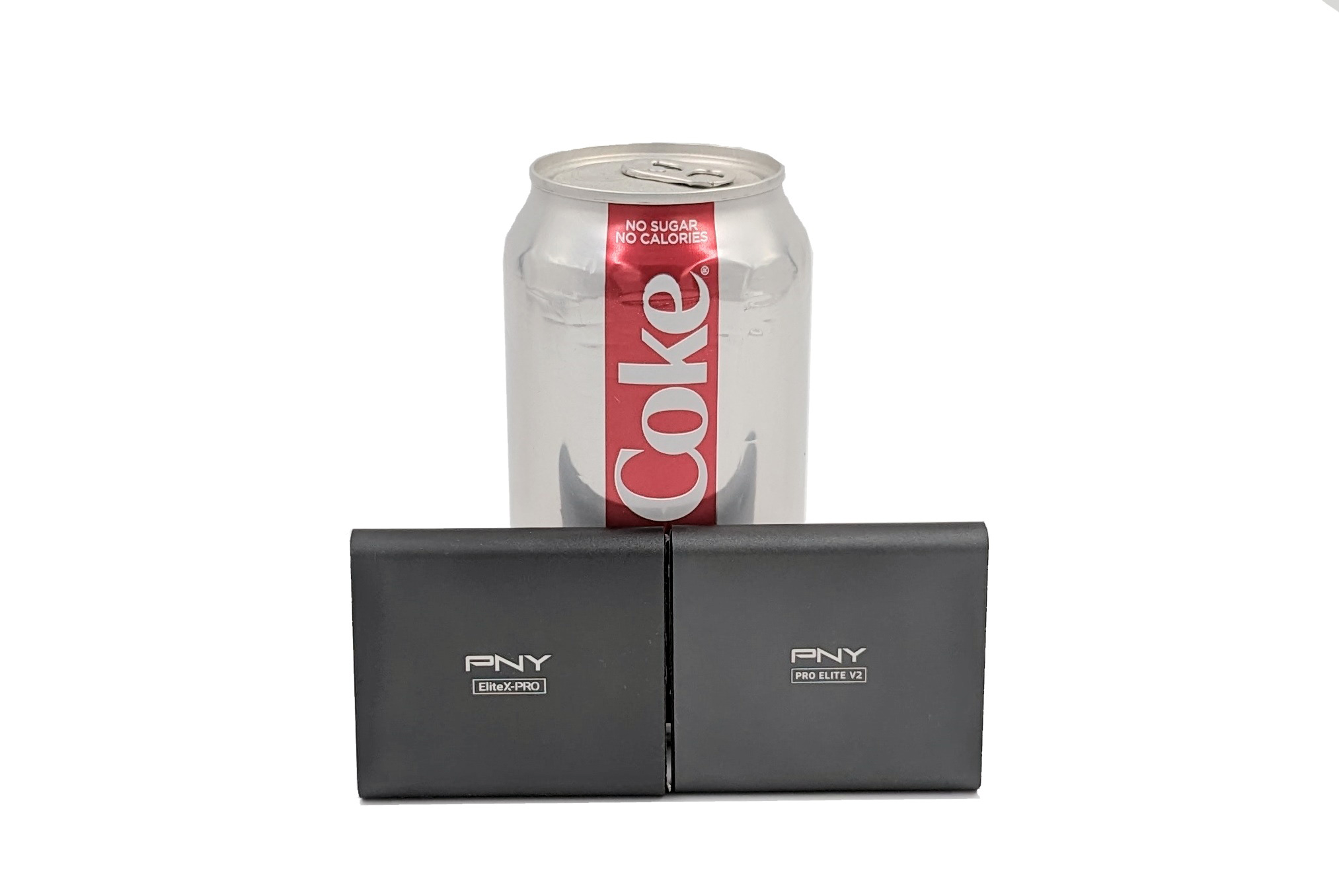
The Pro Elite V2 and the EliteX-PRO have identical industrial designs and dimensions, with only the product name printed on the aluminum body serving as a differentiator. The design is reminiscent of the Samsung Portable SSD T5, but manages to retain a more compact and sleek form-factor. This review takes a detailed look at the performance and value proposition of the 1 TB Pro Elite V2 and the 4 TB EliteX-PRO, with a particular focus on how they stack up against the existing players in the segment.
Rapid advancements in flash technology (including the development of 3D NAND and improvements in TLC reliability) have been accompanied by the appearance of faster host interfaces for external devices in the last decade. Together, they have contributed to bus-powered direct-attached storage devices growing in both storage capacity and speeds. The Type-C standard has also achieved widespread acceptance in the consumer market. Protocols such as USB 3.2 Gen 2×2 / USB4 and Thunderbolt riding on top of the Type-C connector have enabled the introduction of palm-sized flash-based storage devices capable of delivering 2GBps+ speeds.
One of the primary challenges with high-speed storage devices is the thermal aspect. Bridge-based solutions with multiple protocol conversion chips tend to dissipate more power due to the additional components. High-performance portable SSDs in the past have had no option but to use them – first, with SATA bridges, and then with NVMe bridges. The introduction of native UFD controllers capable of hitting 10 Gbps and 20 Gbps from Phison and Silicon Motion has opened up yet another option in this category. The Crucial X6, equipped with the Phison U17, was reviewed in August 2021 and was one of the first retail products to surpass the SATA speeds barrier by hitting 800 MBps speeds without using a NVMe bridge. Around the same time, Silicon Motion’s SM2320 powered the Kingston XS2000 to 20 Gbps speeds without a bridge in the middle.
Products based on Silicon Motion’s SM2320 have gained a lot of consumer mindshare because they have typically been able to hit the interface speed limits for sequential accesses in both the 10 Gbps and 20 Gbps categories. Phison’s U17 and U18 were introduced with slightly lower peak performance numbers, and despite vendors like Crucial picking them up for the X6, the products didn’t make any waves. The best implementation of Phison’s U17, in our opinion, was seen in the OWC Envoy Pro Mini. The introduction of faster flash has since allowed portable SSDs (PSSDs) based on the Phison’s native UFD controllers to hit higher speeds. As a result, we have seen an uptick in their adoption. Products such as the Sabrent Rocket Nano v2 and the Corsair EX100U are based on the Phison U18 controller. PNY has also hitched its wagon to the Phison camp for its play in the PSSD market
PNY’s 2023 PSSD lineup includes the Pro Elite V2 in the 10 Gbps category, and the EliteX-PRO in the 20 Gbps one. The galleries below present the packaging and teardown process for the two PSSDs.


Both products are similar in terms of packaging (down to the length of the supplied USB Type-C to Type-C and Type-C to Type-A cables) as well as industrial design. The main difference is in the internal PCB.
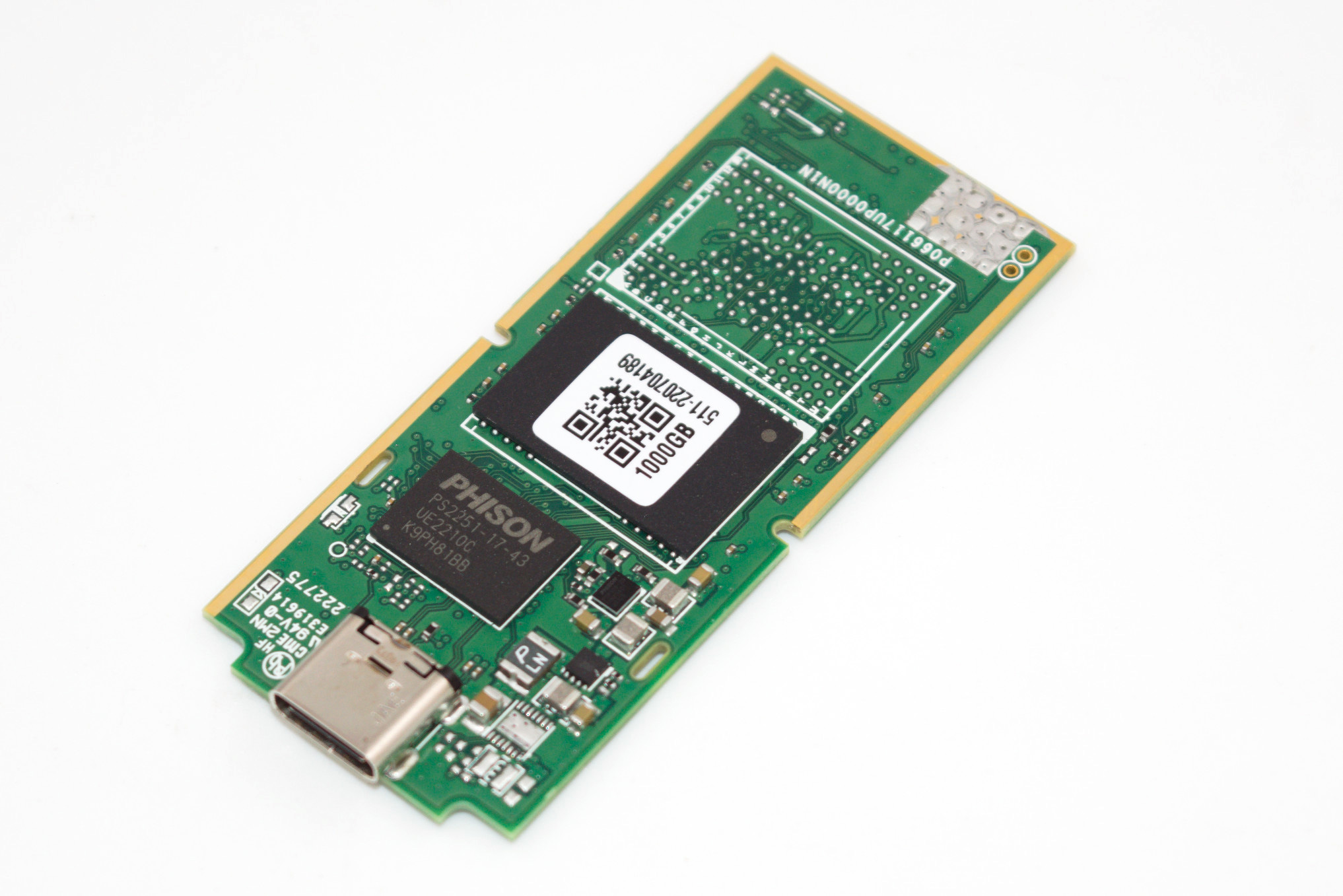
PNY Pro Elite V2 Controller – Phison U17
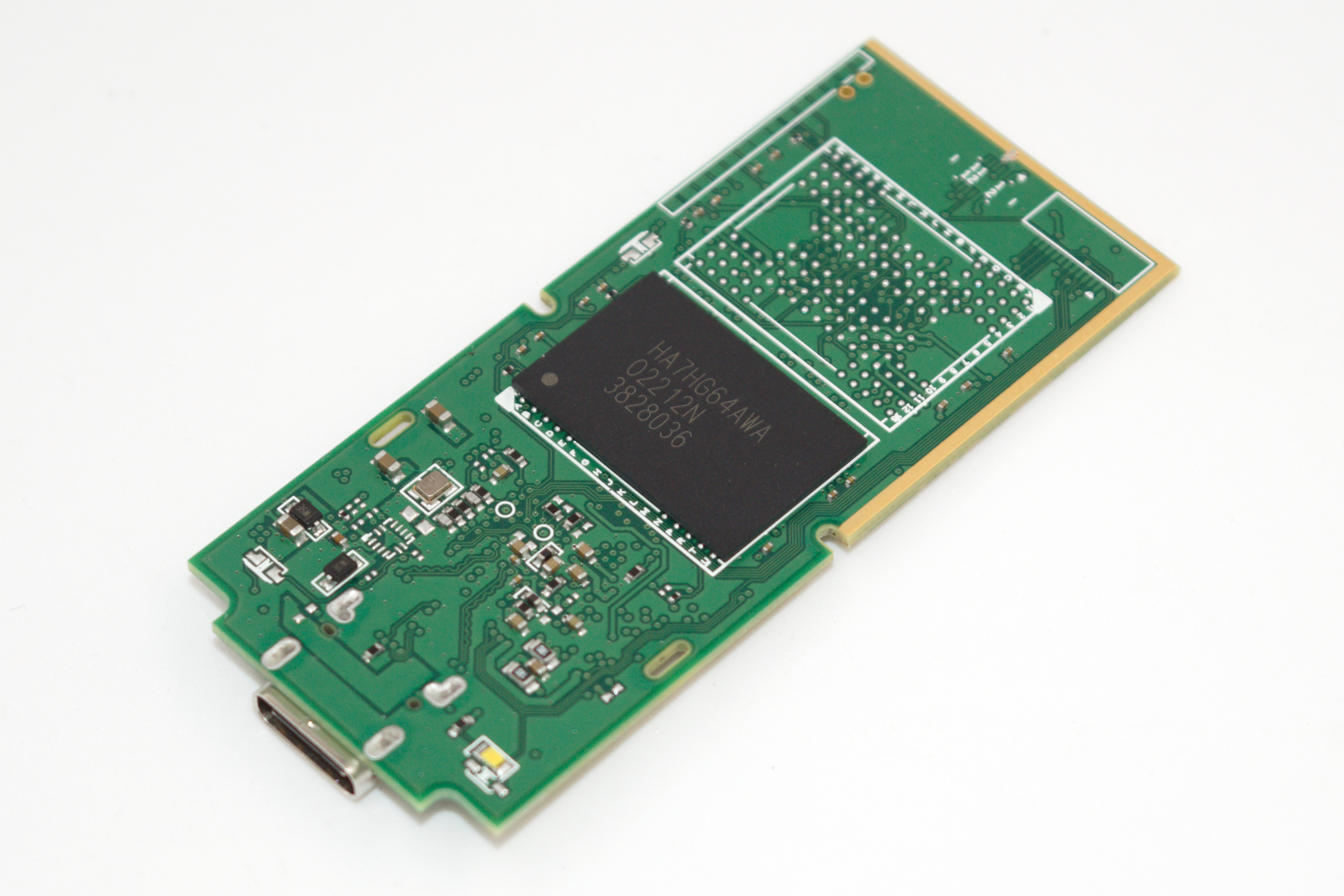
PNY Pro Elite V2 Flash Package – HA7HG64AWA
The 10 Gbps Pro Elite V2 is a Phison U17 design. There is space for four flash packages on the PCB, but PNY has opted only for two packages in the product’s top capacity. The HA7HG64AWA is a NAND flash package with 128L 3D TLC from SK hynix. It has 8 x 512 Gbit dies for a total of 512 GB per package. There is one on each side of the PCB.
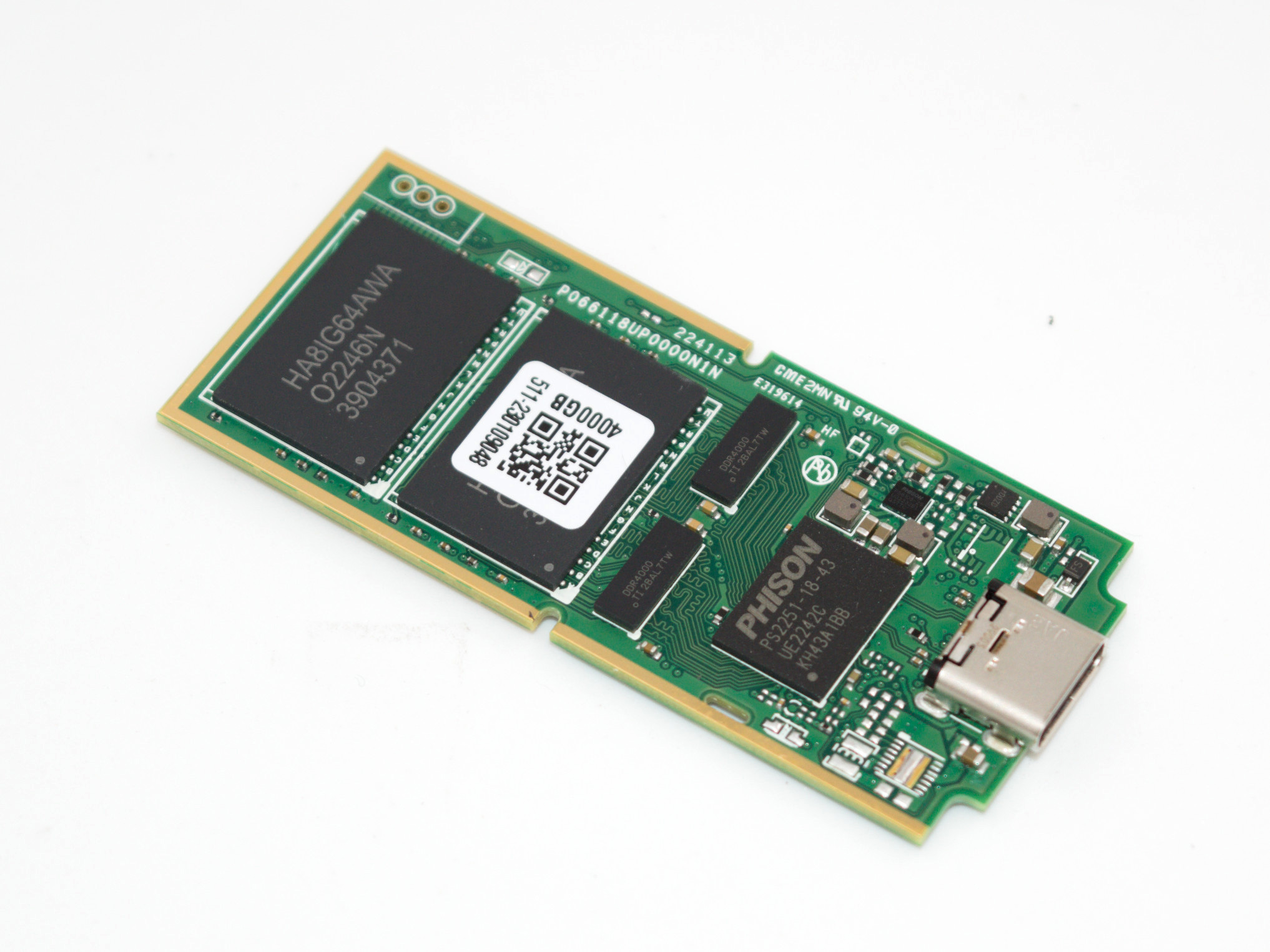
PNY EliteX-PRO Controller – Phison U18
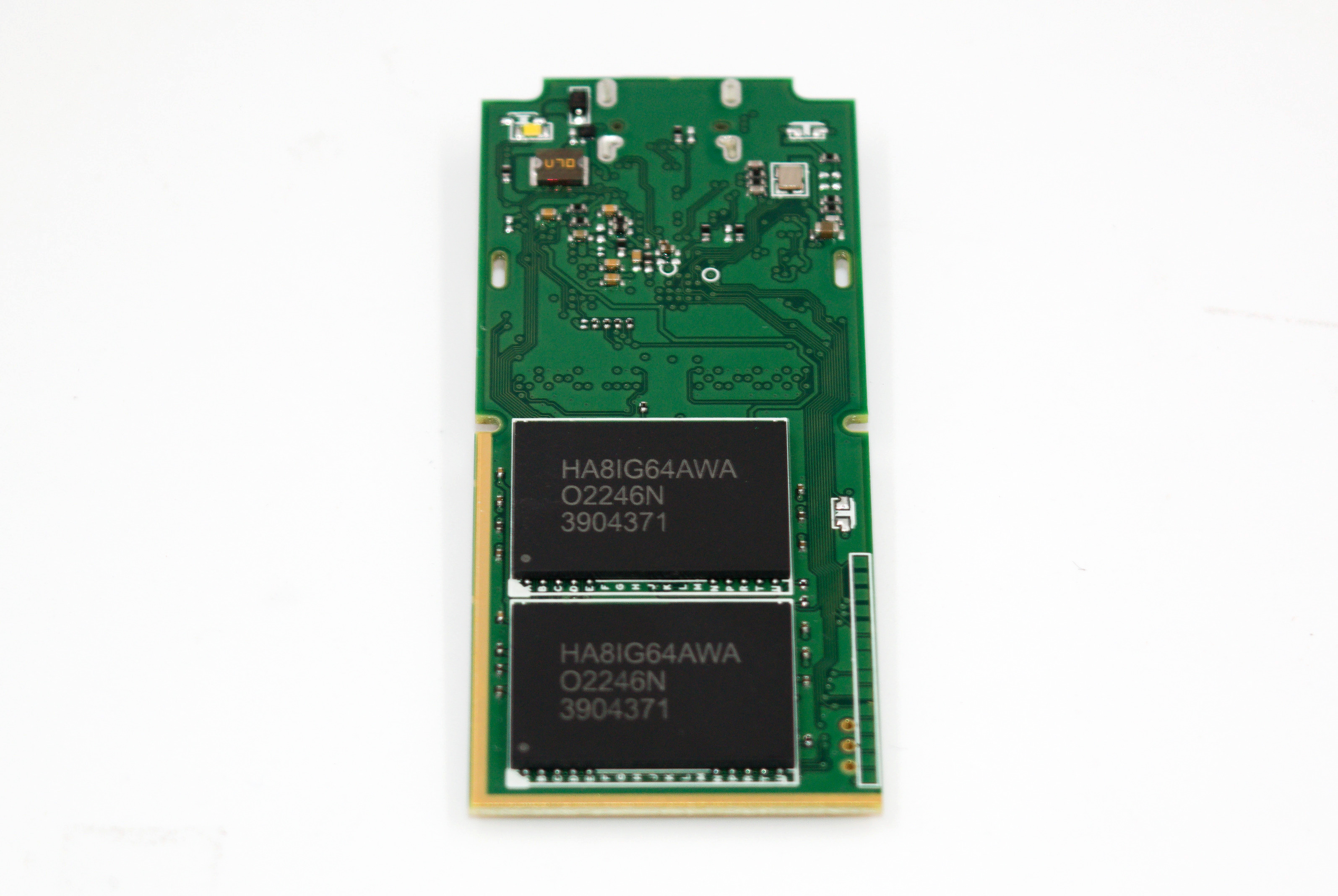
PNY EliteX-PRO Flash Package – HA8IG64AWA
The 20 Gbps EliteX-PRO is a Phison U18 design. There is space for four flash packages on the PCB, and the 4 TB capacity version has all four slots filled up. The HA8IG64AWA is a NAND flash package with 128L 3D TLC from SK hynix. The company’s 128L NAND had initially appeared in the form of 512 Gbit dies, but in the second half of 2021, 1 Tbit dies also started appearing (for example, in the 2 TB version of the SK hynix Gold P31). The HA8IG64AWA is likely equipped with 8 x 1 Tbit dies for a total of 1 TB per package. There are two on each side of the PCB in the 4 TB version.
There is no specific thermal solution for the controller or flash in either of the PSSDs. The SK hynix 128L 3D TLC NAND is noted for its power efficiency, and that probably played a role in PNY’s decision. The interesting part of the EliteX-PRO PCB is the presence of two TI DDR4000 ICs. These are 1:2 DDR switches / multiplexers. On this PCB, they are used for high-speed signal switching to help interface four flash packages with the two-channel U18 controller.
The industrial design of the Pro Elite V2 and the EliteX-PRO is not unique, with many similarities to the Samsung Portable SSD T5. Thankfully, PNY has opted for an aluminum casing and this lends a solid look and feel to the PSSDs.
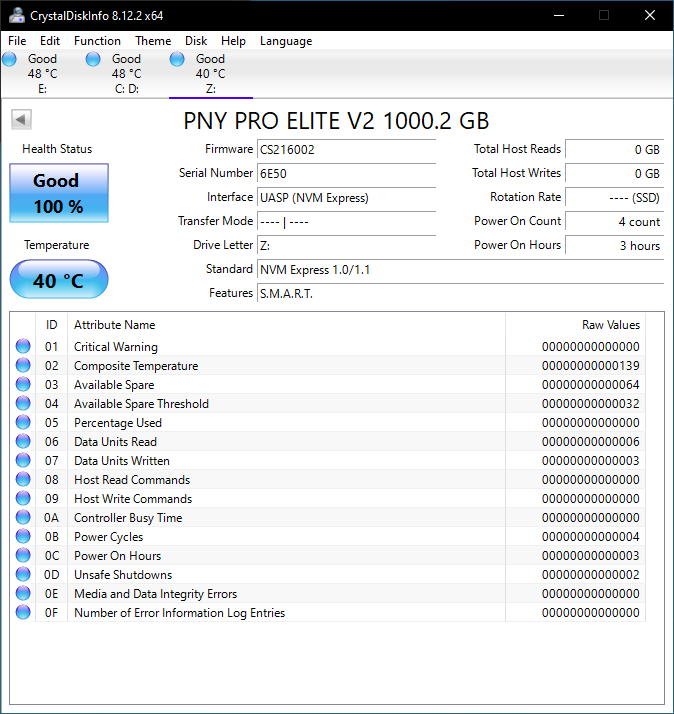
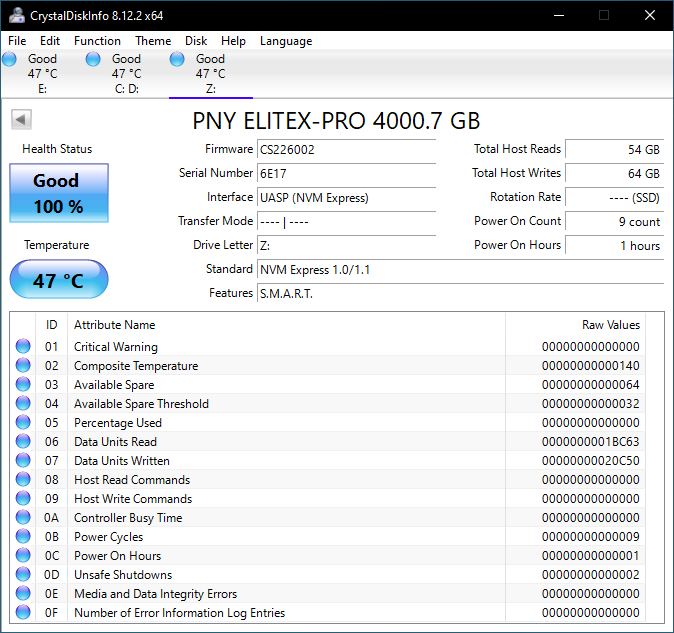
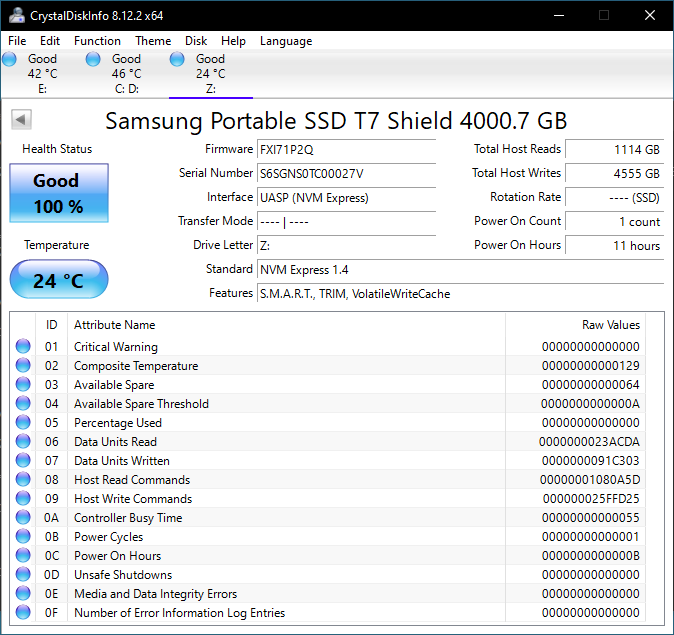
Since we are dealing with two different PSSD classes / capacity points, this review will include separate comparison graphs and tables for each. CrystalDiskInfo provides a quick overview of the capabilities of the internal storage device. Despite TRIM not being noted in the features list, we found NTFS volumes on both PSSDs successfully processing TRIM commands from Windows. All S.M.A.R.T features such as temperature read outs worked well.
| S.M.A.R.T Passthrough for 1 TB PSSDs – CrystalDiskInfo | |
 |
 |
| S.M.A.R.T Passthrough for 4 TB PSSDs – CrystalDiskInfo | |
 |
 |
The table below presents a comparative view of the specifications of the different 1 TB PSSDs presented in this review.
| Comparative 1 TB Direct-Attached Storage Devices Configuration | ||
| Aspect | ||
| Downstream Port | Native Flash | Native Flash |
| Upstream Port | USB 3.2 Gen 2 Type-C | USB 3.2 Gen 2 Type-A (Male) |
| Bridge Chip | Phison U17 | Silicon Motion SM2320 |
| Power | Bus Powered | Bus Powered |
| Use Case | Light-weight 1GBps-class portable SSD in a pocketable form-factor | 1GBps-class, compact USB thumb drive with retractable cover for Type-A connector |
| Physical Dimensions | 63.5 mm x 57.2 mm x 10.9 mm | 91.2 mm x 22.3 mm x 9.5 mm |
| Weight | 34 grams (without cable) | 14.5 grams |
| Cable | 18 cm USB 3.2 Gen 2×2 Type-C to Type-C 17 cm USB 3.2 Gen 2 Type-C to Type-A |
N/A |
| S.M.A.R.T Passthrough | Yes | Yes |
| UASP Support | Yes | Yes |
| TRIM Passthrough | Yes | Yes |
| Hardware Encryption | Not Available | Not Available |
| Evaluated Storage | SK hynix 128L 3D TLC | Toshiba BiCS5 112L 3D TLC |
| Price (Launch) | USD 70 | USD 180 |
| Review Link | PNY Pro Elite V2 Portable SSD 1TB Review | Kingston DTMAXA/1TB Review |
The equivalent comparison table for the 4 TB PSSDs is presented below.
| Comparative Direct-Attached Storage Devices Configuration | ||
| Aspect | ||
| Downstream Port | Native Flash | PCIe 3.0 x2 |
| Upstream Port | USB 3.2 Gen 2×2 Type-C | USB 3.2 Gen 2 Type-C |
| Bridge Chip | Phison U18 | ASMedia ASM2362 |
| Power | Bus Powered | Bus Powered |
| Use Case | Light-weight 2GBps-class portable SSD in a pocketable form-factor | Light-weight 1GBps-class portable SSD with a durability focus (IP65 rating) |
| Physical Dimensions | 63.5 mm x 57.2 mm x 10.9 mm | 88 mm x 59 mm x 13 mm |
| Weight | 35 grams (without cable) | 98 grams |
| Cable | 18 cm USB 3.2 Gen 2×2 Type-C to Type-C 17 cm USB 3.2 Gen 2 Type-C to Type-A |
45 cm USB 3.2 Gen 2 Type-C to Type-C 45 cm USB 3.2 Gen 2 Type-C to Type-A |
| S.M.A.R.T Passthrough | Yes | Yes |
| UASP Support | Yes | Yes |
| TRIM Passthrough | Yes | Yes |
| Hardware Encryption | Not Available | Yes |
| Evaluated Storage | SK hynix 128L 3D TLC | Samsung 136L V-NAND (6th Gen.) |
| Price (Launch) | USD 300 | USD 410 |
| Review Link | PNY EliteX-PRO Portable SSD 4TB Review | Samsung Portable SSD T7 Shield 4TB Review |
Prior to looking at the benchmark numbers, power consumption, and thermal solution effectiveness, a description of the testbed setup and evaluation methodology is provided.
Testbed Setup and Evaluation Methodology
Direct-attached storage devices (including thumb drives) are evaluated using the Quartz Canyon NUC (essentially, the Xeon / ECC version of the Ghost Canyon NUC) configured with 2x 16GB DDR4-2667 ECC SODIMMs and a PCIe 3.0 x4 NVMe SSD – the IM2P33E8 1TB from ADATA.
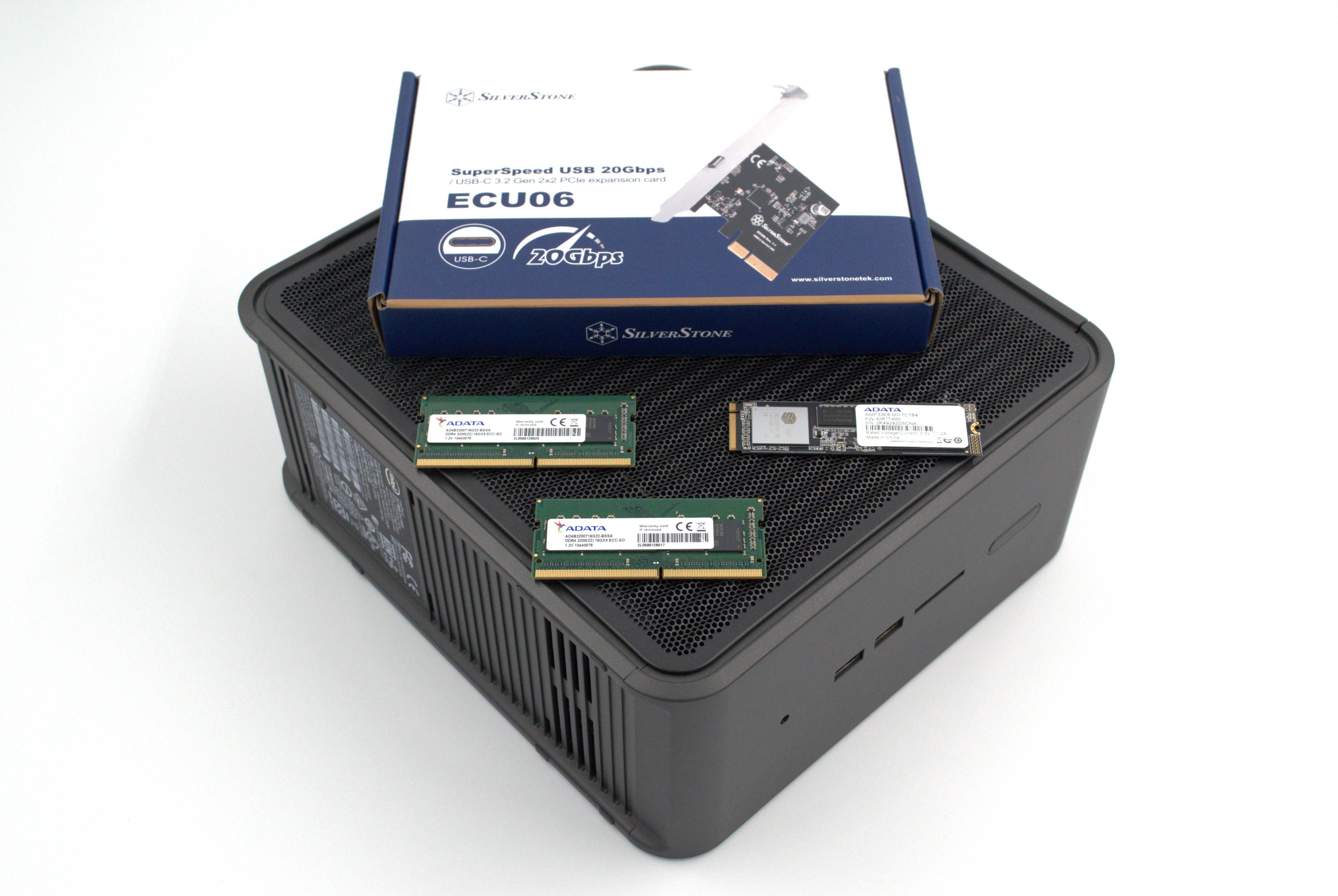
The most attractive aspect of the Quartz Canyon NUC is the presence of two PCIe slots (electrically, x16 and x4) for add-in cards. In the absence of a discrete GPU – for which there is no need in a DAS testbed – both slots are available. In fact, we also added a spare SanDisk Extreme PRO M.2 NVMe SSD to the CPU direct-attached M.2 22110 slot in the baseboard in order to avoid DMI bottlenecks when evaluating Thunderbolt 3 devices. This still allows for two add-in cards operating at x8 (x16 electrical) and x4 (x4 electrical). Since the Quartz Canyon NUC doesn’t have a native USB 3.2 Gen 2×2 port, Silverstone’s SST-ECU06 add-in card was installed in the x4 slot. All non-Thunderbolt devices are tested using the Type-C port enabled by the SST-ECU06.
The specifications of the testbed are summarized in the table below:
| The 2021 AnandTech DAS Testbed Configuration | |
| System | Intel Quartz Canyon NUC9vXQNX |
| CPU | Intel Xeon E-2286M |
| Memory | ADATA Industrial AD4B3200716G22 32 GB (2x 16GB) DDR4-3200 ECC @ 22-22-22-52 |
| OS Drive | ADATA Industrial IM2P33E8 NVMe 1TB |
| Secondary Drive | SanDisk Extreme PRO M.2 NVMe 3D SSD 1TB |
| Add-on Card | SilverStone Tek SST-ECU06 USB 3.2 Gen 2×2 Type-C Host |
| OS | Windows 10 Enterprise x64 (21H1) |
| Thanks to ADATA, Intel, and SilverStone Tek for the build components | |
The testbed hardware is only one segment of the evaluation. Over the last few years, the typical direct-attached storage workloads for memory cards have also evolved. High bit-rate 4K videos at 60fps have become quite common, and 8K videos are starting to make an appearance. Game install sizes have also grown steadily even in portable game consoles, thanks to high resolution textures and artwork. Keeping these in mind, our evaluation scheme for portable SSDs and UFDs involves multiple workloads which are described in detail in the corresponding sections.
- Synthetic workloads using CrystalDiskMark and ATTO
- Real-world access traces using PCMark 10’s storage benchmark
- Custom robocopy workloads reflective of typical DAS usage
- Sequential write stress test
In the next couple of sections, we have an overview of the performance of the two PNY PSSDs in these benchmarks. Prior to providing concluding remarks, we have some observations on the drives’ power consumption numbers and thermal solution also.
Benchmarks such as ATTO and CrystalDiskMark help provide a quick look at the performance of the direct-attached storage device. The results translate to the instantaneous performance numbers that consumers can expect for specific workloads, but do not account for changes in behavior when the unit is subject to long-term conditioning and/or thermal throttling. Yet another use of these synthetic benchmarks is the ability to gather information regarding support for specific storage device features that affect performance.
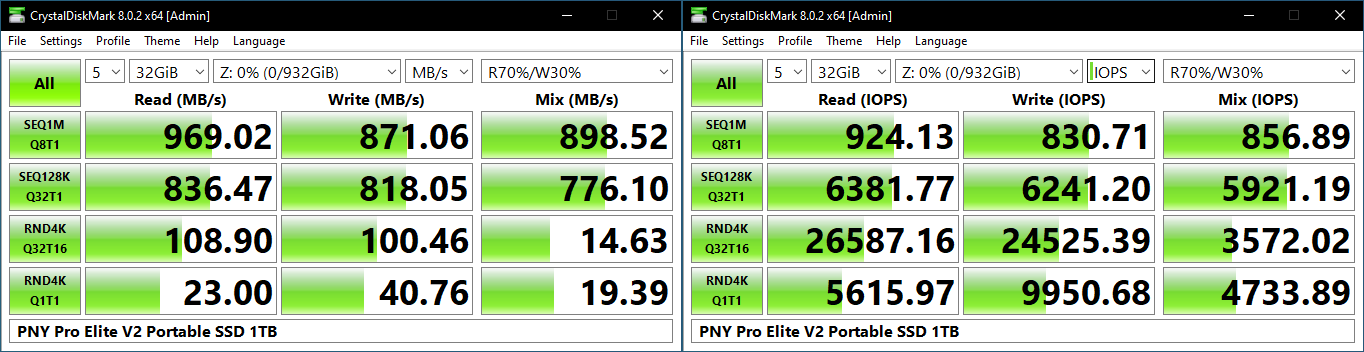
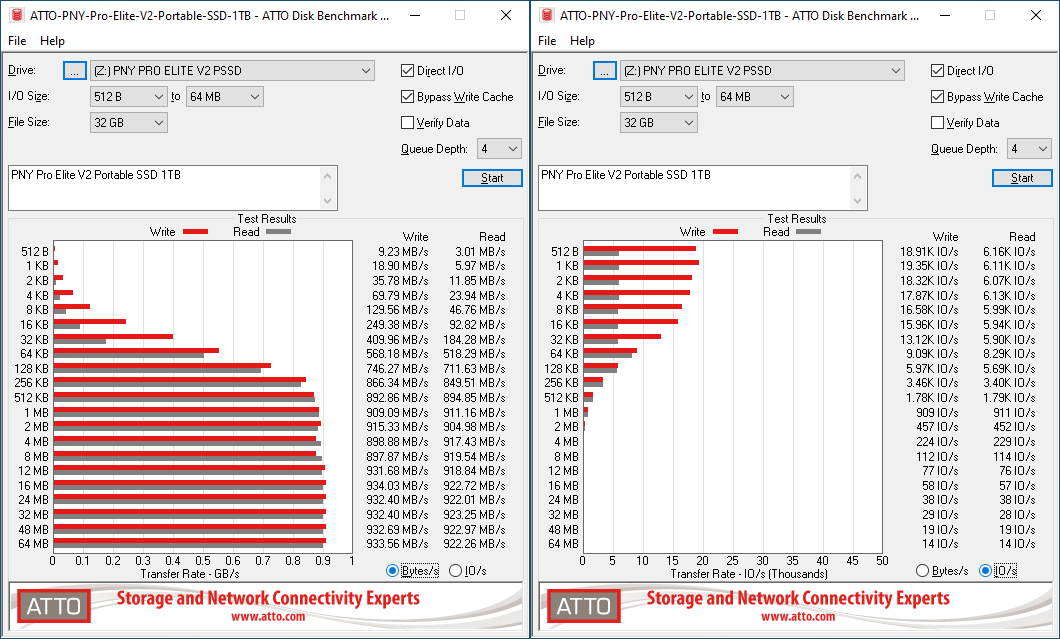
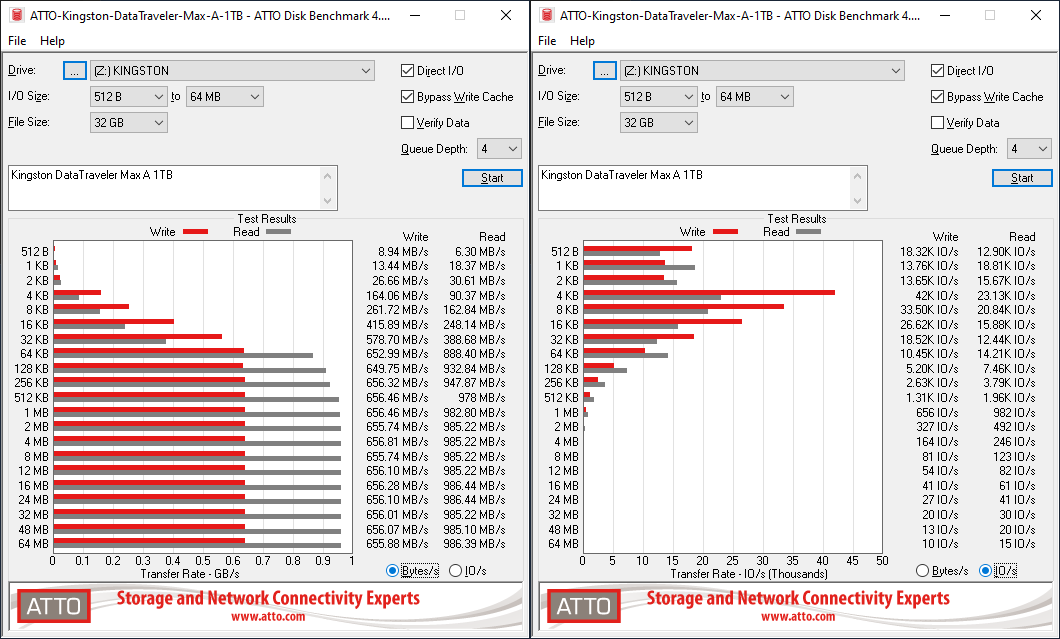
PNY claims read and write speeds of 1100 MBps and 1000 MBps respectively, and numbers close to this are hit in our ATTO benchmark configuration. ATTO benchmarking is restricted to a single configuration in terms of queue depth, and is only representative of a small sub-set of real-world workloads. It does allow the visualization of change in transfer rates as the I/O size changes, with optimal performance being reached around 16 MB for a queue depth of 4.
| ATTO Benchmarks | |
| TOP: | BOTTOM: |
 |
|
 |
|
The performance of the Pro Elite V2 in the ATTO benchmark is very similar to that of the OWC Envoy Pro Mini. The performance profile is better than the Transcend ESD310C and the Kingston DT Max series, but loses out to bridge-based solutions like the Samsung T7 Touch and the OWC Envoy Pro Elektron.
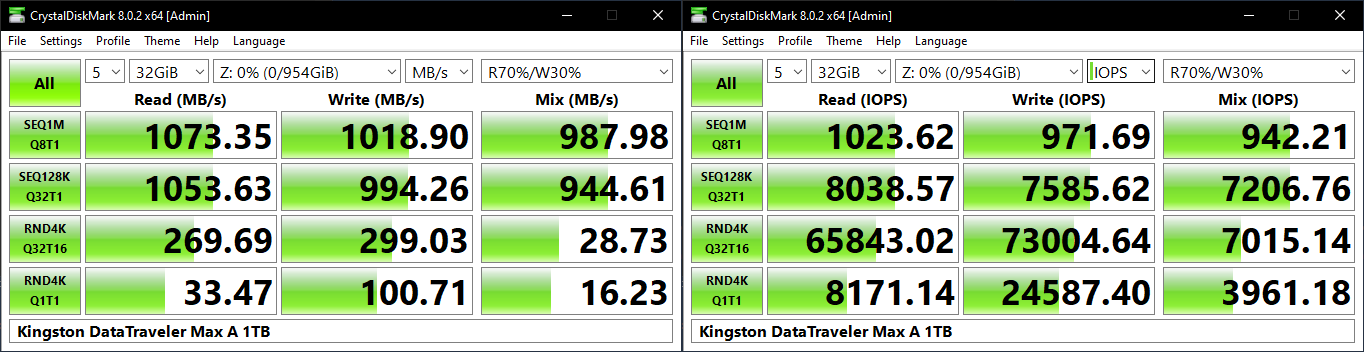
CrystalDiskMark uses four different access traces for reads and writes over a configurable region size. Two of the traces are sequential accesses, while two are 4K random accesses. Internally, CrystalDiskMark uses the Microsoft DiskSpd storage testing tool. The ‘Seq128K Q32T1’ sequential traces use 128K block size with a queue depth of 32 from a single thread, while the ‘4K Q32T16’ one does random 4K accesses with the same queue configuration, but from multiple threads. The ‘Seq1M’ traces use a 1MiB block size. The plain ‘Rnd4K’ one uses only a single queue and single thread . Comparing the ‘4K Q32T16’ and ‘4K Q1T1’ numbers can quickly tell us whether the storage device supports NCQ (native command queuing) / UASP (USB-attached SCSI protocol). If the numbers for the two access traces are in the same ballpark, NCQ / UASP is not supported. This assumes that the host port / drivers on the PC support UASP.
| CrystalDiskMark Benchmarks | |
| TOP: | BOTTOM: |
 |
|
Variations in queue depth bring out the performance potential of the SM2320-based PSSDs over the Phison solutions. Other than that, we see the Pro Elite V2 and the OWC Envy Pro Mini perform very similar to each other. The numbers for the bridge-based solutions are obviously better.
Our testing methodology for storage bridges / direct-attached storage units takes into consideration the usual use-case for such devices. The most common usage scenario is transfer of large amounts of photos and videos to and from the unit. Other usage scenarios include the use of the unit as a download or install location for games and importing files directly from it into a multimedia editing program such as Adobe Photoshop. Some users may even opt to boot an OS off an external storage device.
The AnandTech DAS Suite tackles the first use-case. The evaluation involves processing five different workloads:
- AV: Multimedia content with audio and video files totalling 24.03 GB over 1263 files in 109 sub-folders
- Home: Photos and document files totalling 18.86 GB over 7627 files in 382 sub-folders
- BR: Blu-ray folder structure totalling 23.09 GB over 111 files in 10 sub-folders
- ISOs: OS installation files (ISOs) totalling 28.61 GB over 4 files in one folder
- Disk-to-Disk: Addition of 223.32 GB spread over 171 files in 29 sub-folders to the above four workloads (total of 317.91 GB over 9176 files in 535 sub-folders)
Except for the ‘Disk-to-Disk’ workload, each data set is first placed in a 29GB RAM drive, and a robocopy command is issue to transfer it to the external storage unit (formatted in exFAT for flash-based units, and NTFS for HDD-based units).
robocopy /NP /MIR /NFL /J /NDL /MT:32 $SRC_PATH $DEST_PATH
Upon completion of the transfer (write test), the contents from the unit are read back into the RAM drive (read test) after a 10 second idling interval. This process is repeated three times for each workload. Read and write speeds, as well as the time taken to complete each pass are recorded. Whenever possible, the temperature of the external storage device is recorded during the idling intervals. Bandwidth for each data set is computed as the average of all three passes.
The ‘Disk-to-Disk’ workload involves a similar process, but with one iteration only. The data is copied to the external unit from the CPU-attached NVMe drive, and then copied back to the internal drive. It does include more amount of continuous data transfer in a single direction, as data that doesn’t fit in the RAM drive is also part of the workload set.
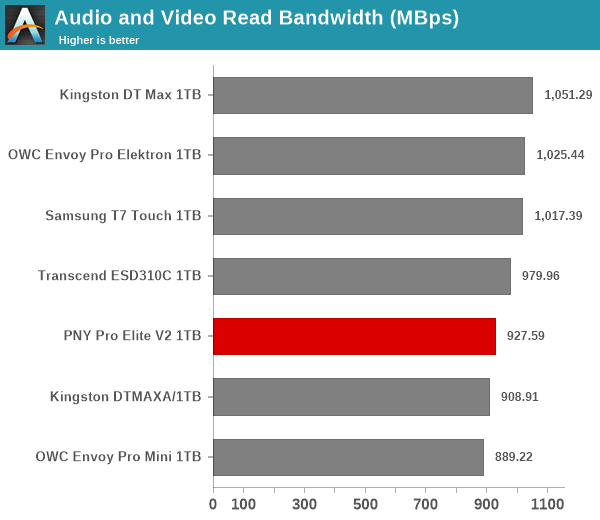
All the considered PSSDs start out with similar numbers for the initial benchmark components. However, as the stress keeps getting sustained, we see the bridge-based solutions emerging as the top performers (evident in the disk-to-disk numbers). For all practical purposes, the casual user will notice no difference between them in the course of normal usage which involve short bursts of writes. However, power users may want to dig deeper to understand the limits of each device. To address this concern, we also instrumented our evaluation scheme for determining performance consistency.
Performance Consistency
Aspects influencing the performance consistency include SLC caching and thermal throttling / firmware caps on access rates to avoid overheating. This is important for power users, as the last thing that they want to see when copying over 100s of GB of data is the transfer rate going down to USB 2.0 speeds.
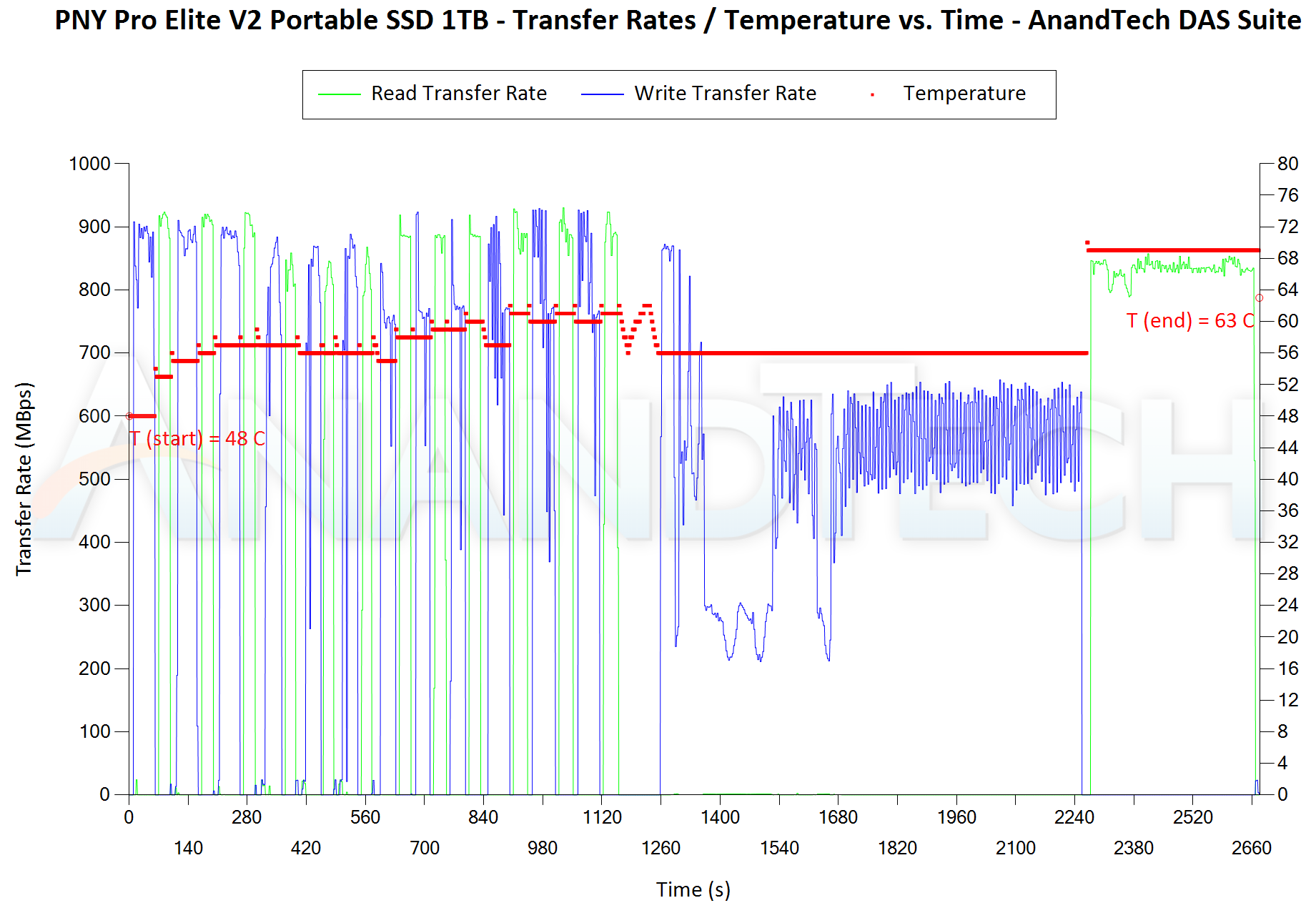
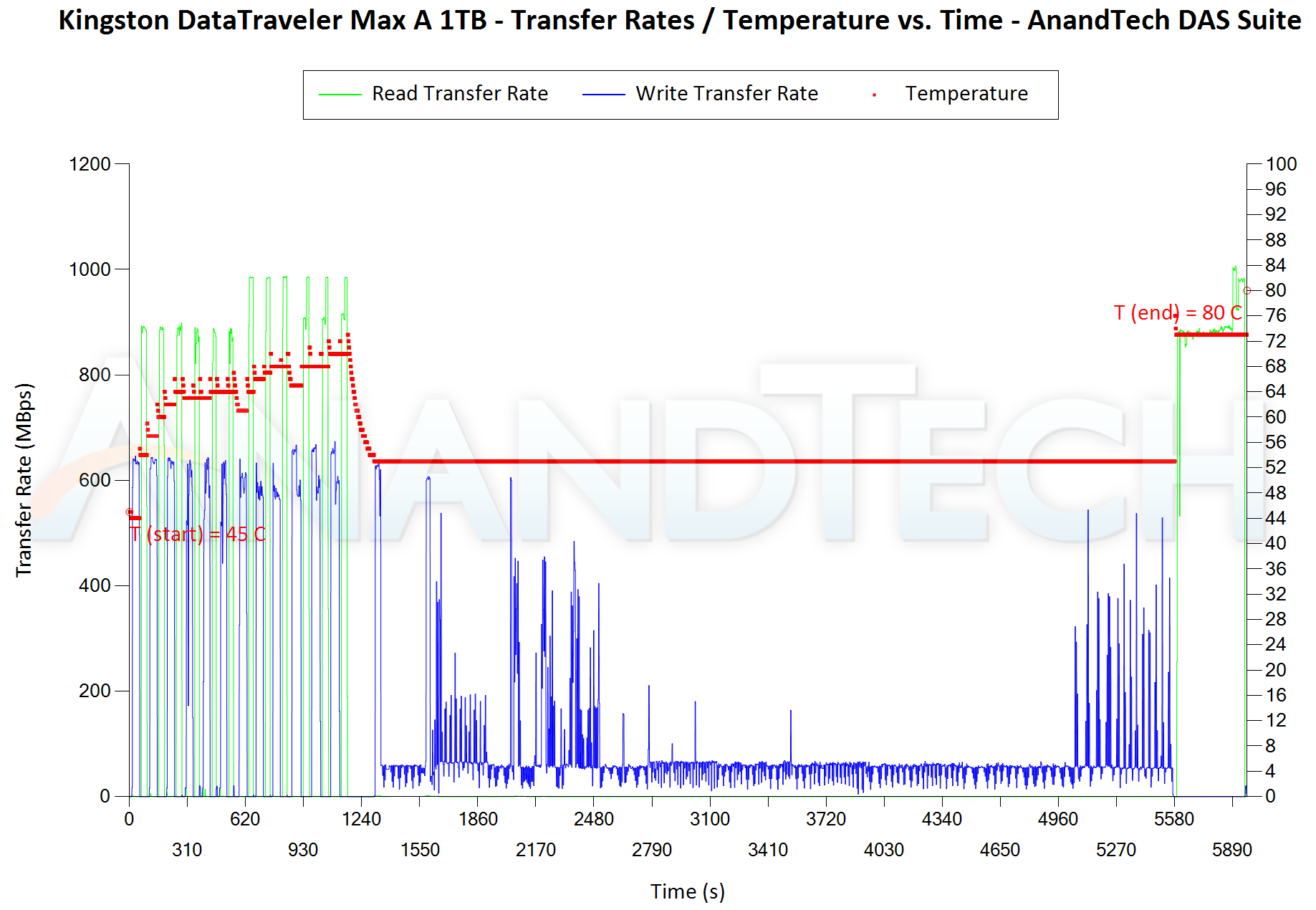
In addition to tracking the instantaneous read and write speeds of the DAS when processing the AnandTech DAS Suite, the temperature of the drive was also recorded. In earlier reviews, we used to track the temperature all through. However, we have observed that SMART read-outs for the temperature in NVMe SSDs using USB 3.2 Gen 2 bridge chips end up negatively affecting the actual transfer rates. To avoid this problem, we have restricted ourselves to recording the temperature only during the idling intervals. The graphs below present the recorded data.
| AnandTech DAS Suite – Performance Consistency | |
| TOP: | BOTTOM: |
 |
|
 |
|
The first three sets of writes and reads correspond to the AV suite. A small gap (for the transfer of the video suite from the internal SSD to the RAM drive) is followed by three sets for the Home suite. Another small RAM-drive transfer gap is followed by three sets for the Blu-ray folder. This is followed up with the large-sized ISO files set. Finally, we have the single disk-to-disk transfer set. The most interesting comparison (based on the results in the previous subsections) is between the PNY Pro Elite V2 and the OWC Envoy Pro Mini – we see that the OWC thumb drive gets thermally throttled after hitting 60C, but still got hot enough to hit 78C. The larger size of the PNY Pro Elite V2 and the spread out PCB components ensure that the same workload is managed successfully to keep the temperatures below 70C. Some SLC caching issues are seen in the disk-to-disk transfer set, but post-partial recovery numbers appears quite reasonable. Writes at 500 MBps and reads at 800 MBps towards the end are quite good for a native UFD controller solution. Only the bridge-based solutions are better in that aspect. The Pro Elite V2 also seems to guarantee a minimum write speed of around 200 MBps – very similar to that of the OWC Envoy Pro Mini in its thermally throttle state.
There are a number of storage benchmarks that can subject a device to artificial access traces by varying the mix of reads and writes, the access block sizes, and the queue depth / number of outstanding data requests. We saw results from two popular ones – ATTO, and CrystalDiskMark – in a previous section. More serious benchmarks, however, actually replicate access traces from real-world workloads to determine the suitability of a particular device for a particular workload. Real-world access traces may be used for simulating the behavior of computing activities that are limited by storage performance. Examples include booting an operating system or loading a particular game from the disk.
PCMark 10’s storage bench (introduced in v2.1.2153) includes four storage benchmarks that use relevant real-world traces from popular applications and common tasks to fully test the performance of the latest modern drives:
- The Full System Drive Benchmark uses a wide-ranging set of real-world traces from popular applications and common tasks to fully test the performance of the fastest modern drives. It involves a total of 204 GB of write traffic.
- The Quick System Drive Benchmark is a shorter test with a smaller set of less demanding real-world traces. It subjects the device to 23 GB of writes.
- The Data Drive Benchmark is designed to test drives that are used for storing files rather than applications. These typically include NAS drives, USB sticks, memory cards, and other external storage devices. The device is subjected to 15 GB of writes.
- The Drive Performance Consistency Test is a long-running and extremely demanding test with a heavy, continuous load for expert users. In-depth reporting shows how the performance of the drive varies under different conditions. This writes more than 23 TB of data to the drive.
Despite the data drive benchmark appearing most suitable for testing direct-attached storage, we opt to run the full system drive benchmark as part of our evaluation flow. Many of us use portable flash drives as boot drives and storage for Steam games. These types of use-cases are addressed only in the full system drive benchmark.
The Full System Drive Benchmark comprises of 23 different traces. For the purpose of presenting results, we classify them under five different categories:
- Boot: Replay of storage access trace recorded while booting Windows 10
- Creative: Replay of storage access traces recorded during the start up and usage of Adobe applications such as Acrobat, After Effects, Illustrator, Premiere Pro, Lightroom, and Photoshop.
- Office: Replay of storage access traces recorded during the usage of Microsoft Office applications such as Excel and Powerpoint.
- Gaming: Replay of storage access traces recorded during the start up of games such as Battlefield V, Call of Duty Black Ops 4, and Overwatch.
- File Transfers: Replay of storage access traces (Write-Only, Read-Write, and Read-Only) recorded during the transfer of data such as ISOs and photographs.
PCMark 10 also generates an overall score, bandwidth, and average latency number for quick comparison of different drives. The sub-sections in the rest of the page reference the access traces specified in the PCMark 10 Technical Guide.
Booting Windows 10
The read-write bandwidth recorded for each drive in the boo access trace is presented below.
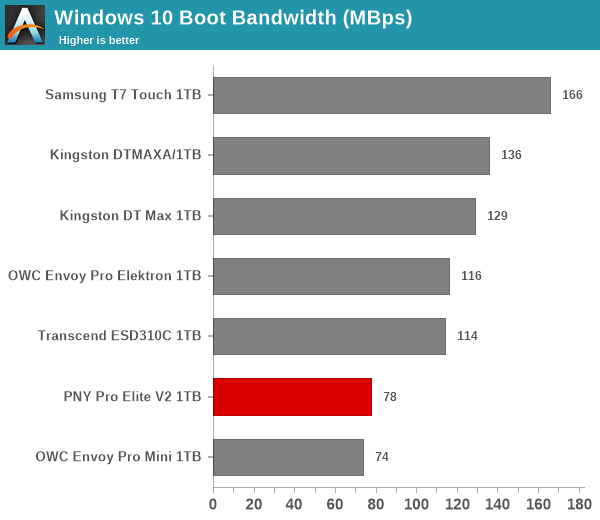
The mixture of low queue depth reads and a few writes in the boot workload seems to work better in the SM2320-based UFDs compared to the Phison U17-based ones. The two in the U17 camp make up the bottom part of the graph.
Creative Workloads
The read-write bandwidth recorded for each drive in the sacr, saft, sill, spre, slig, sps, aft, exc, ill, ind, psh, and psl access traces are presented below.
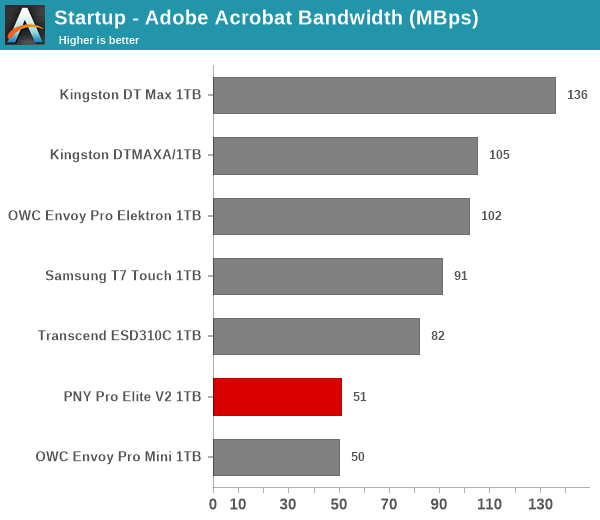
Creative workloads involve a mixture of reads and writes, and bridge-based solutions offer better performance for such scenarios. The PNY Pro Elite V2 comes in second from the last in all of them. The OWC Envoy Pro Mini is likely handicapped by thermal throttling, while the Pro Elite V2 is limited purely by the U17 controller performance.
Office Workloads
The read-write bandwidth recorded for each drive in the exc and pow access traces are presented below.
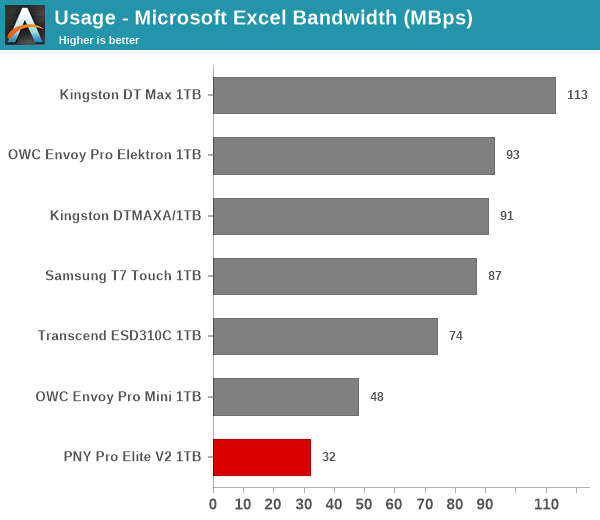
The performance in office workloads is similar to what was seen in the creative workloads set. The Pro Elite V2 fares worse than the OWC Envoy Pro Mini in both components, though not by much. The gulf between them and the SM2320-based Transcend ESD310C is also not too wide, but the other bridge-based solutions have a performance consistency that is only to be expected.
Gaming Workloads
The read-write bandwidth recorded for each drive in the bf, cod, and ow access traces are presented below.
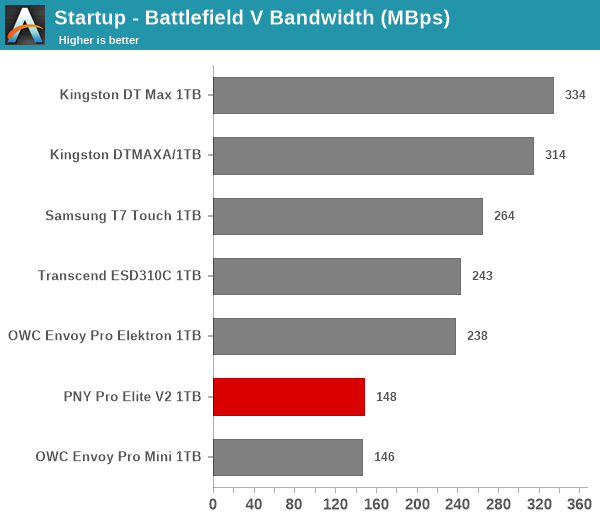
The U17-based PSSDs are both at the bottom of the pack here, with a mixture of sequential and random reads (more of the former) not being particularly performance-friendly for the PNY Pro Elite V2 and the OWC Envoy Pro Mini.
Files Transfer Workloads
The read-write bandwidth recorded for each drive in the cp1, cp2, cp3, cps1, cps2, and cps3 access traces are presented below.
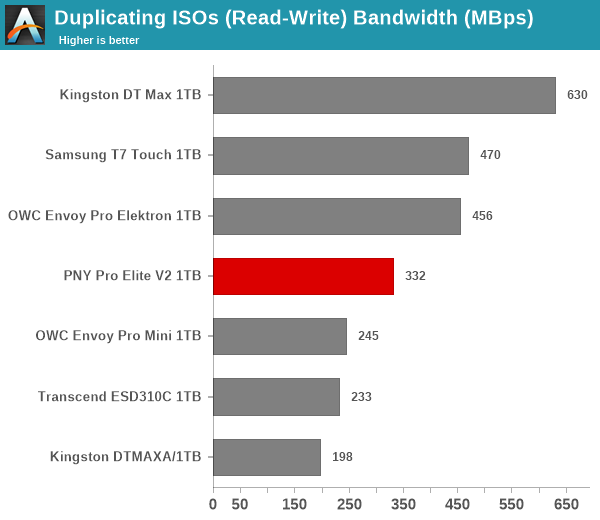
In many of the workloads, the Pro Elite V2 gets itself into the middle of the pack as the other native UFD controller-based solutions battle it outh with thermal throttling or running out of SLC cache.
Overall Scores
PCMark 10 reports an overall score based on the observed bandwidth and access times for the full workload set. The score, bandwidth, and average access latency for each of the drives are presented below.
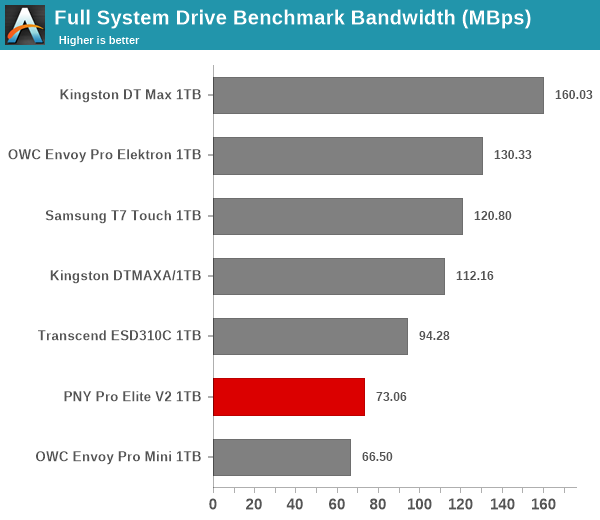
Consistent with the observations made in most of the workload components of the PCMark 10 Storage Bench, the PNY Pro Elite V2 makes up the bottom part of the graphs in this section. Only the much smaller OWC Envoy Pro Mini in a different form-factor (thumb drive) lands below the Pro Elite V2.
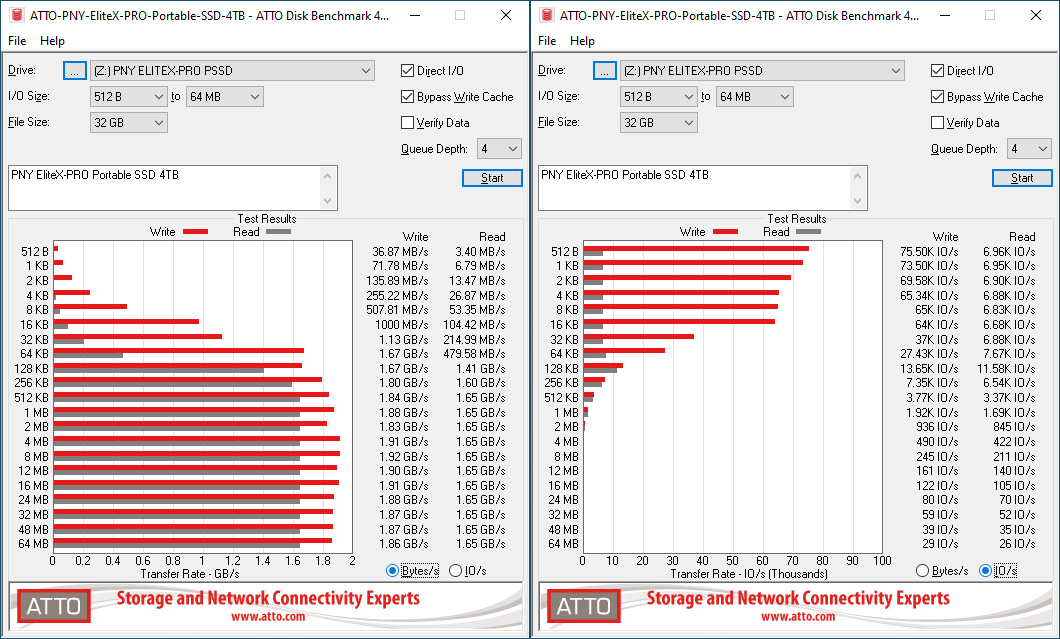
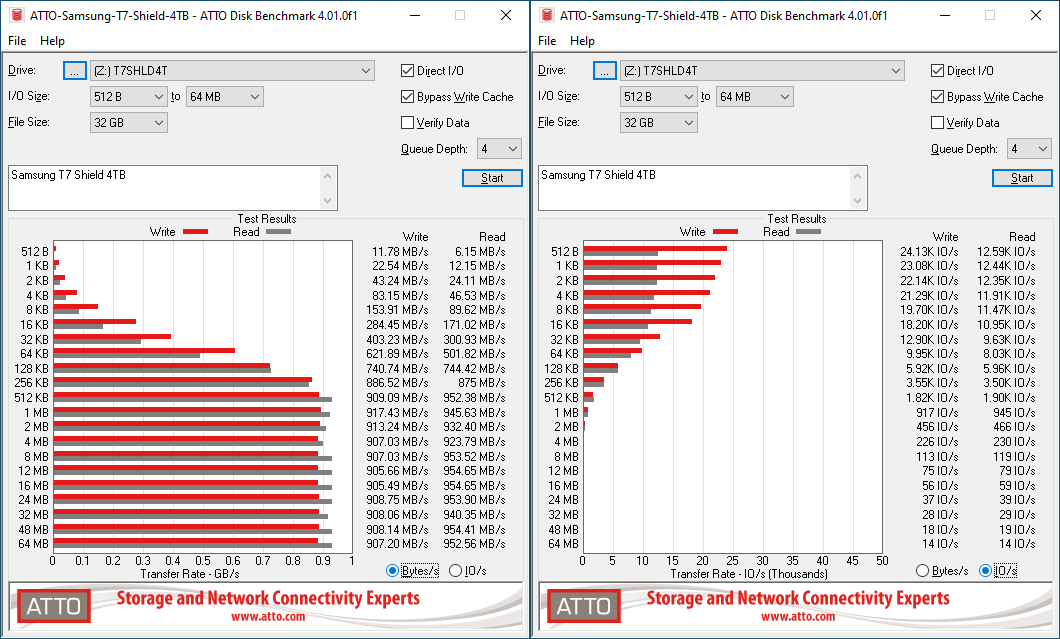
The details of the different performance benchmarks have already been covered in the previous section. Cutting right down to the chase, PNY claims read and write speeds of 1600 MBps and 1500 MBps respectively, and these are actually exceeded in the ATTO benchmarks provided below. This is only representative of a small sub-set of real-world workloads. The change in transfer rates with I/O size can be observed, and optimal performance is reached around 8 MB for a queue depth of 4.
| ATTO Benchmarks | |
| TOP: | BOTTOM: |
 |
|
 |
|
For performance comparisons, the SanDisk Extreme Pro v2 is the only other Gen 2×2 drive in the mix. It is a bridge-based solution and performs better over a range of transfer sizes compared to the EliteX-PRO.
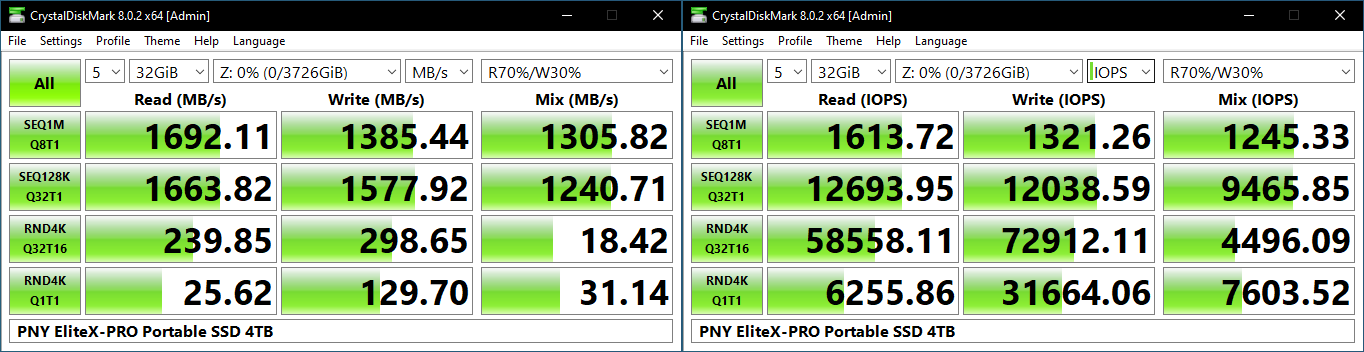
The CrystalDiskMark numbers tally with the claims from PNY – reads come in slightly south of 1700 MBps, and writes at around 1550 MBps for specific sequential workloads. Comparing the ‘4K Q32T16’ and ‘4K Q1T1’ numbers shows that the EliteX-PRO supports NCQ (native command queuing) / UASP (USB-attached SCSI protocol).
| CrystalDiskMark Benchmarks | |
| TOP: | BOTTOM: |
 |
|
 |
|
On the performance front, the EliteX-PRO’s native UFD controller solution is no match for the bridge-based one in the SanDisk PSSD. The latter is able to hit 2 GBps in sequential accesses, and almost double the IOPS under high queue depths.
Our testing methodology for storage bridges / direct-attached storage units takes into consideration the usual use-case for such devices. A description of the AnandTech DAS Suite and its components are available in the previous section.
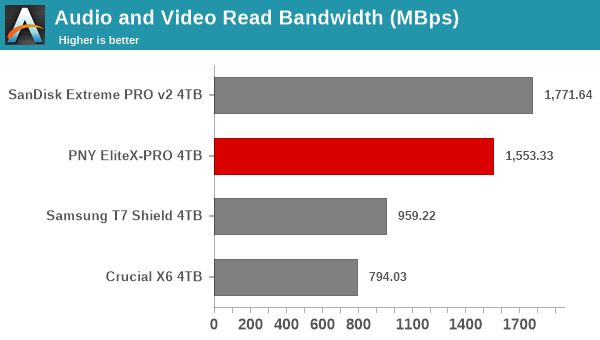
The performance is largely along expected lines. The Gen 2×2 numbers are better than the Gen 2 numbers. The only ‘surprise’ is in the disk-to-disk workload, where the sustained write pressure causes the U18 to get overwhelmed and the bandwidth to go down.
Performance Consistency
Aspects influencing the performance consistency include SLC caching and thermal throttling / firmware caps on access rates to avoid overheating. This is important for power users, as the last thing that they want to see when copying over 100s of GB of data is the transfer rate going down to USB 2.0 speeds.
In addition to tracking the instantaneous read and write speeds of the DAS when processing the AnandTech DAS Suite, the temperature of the drive was also recorded. In earlier reviews, we used to track the temperature all through. However, we have observed that SMART read-outs for the temperature in NVMe SSDs using USB 3.2 Gen 2 bridge chips end up negatively affecting the actual transfer rates. To avoid this problem, we have restricted ourselves to recording the temperature only during the idling intervals. The graphs below present the recorded data.
| AnandTech DAS Suite – Performance Consistency | |
| TOP: | BOTTOM: |
 |
|
 |
|
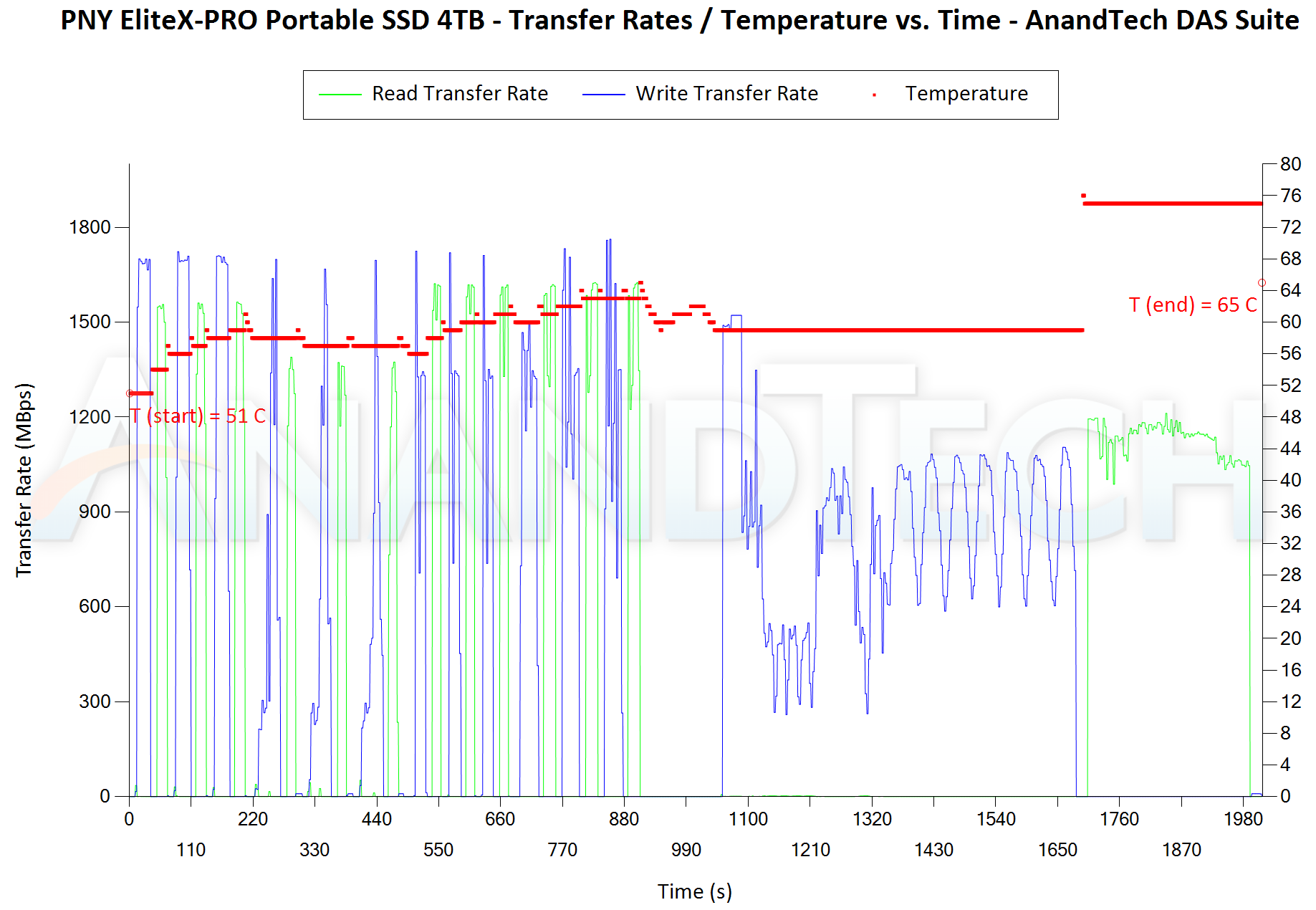
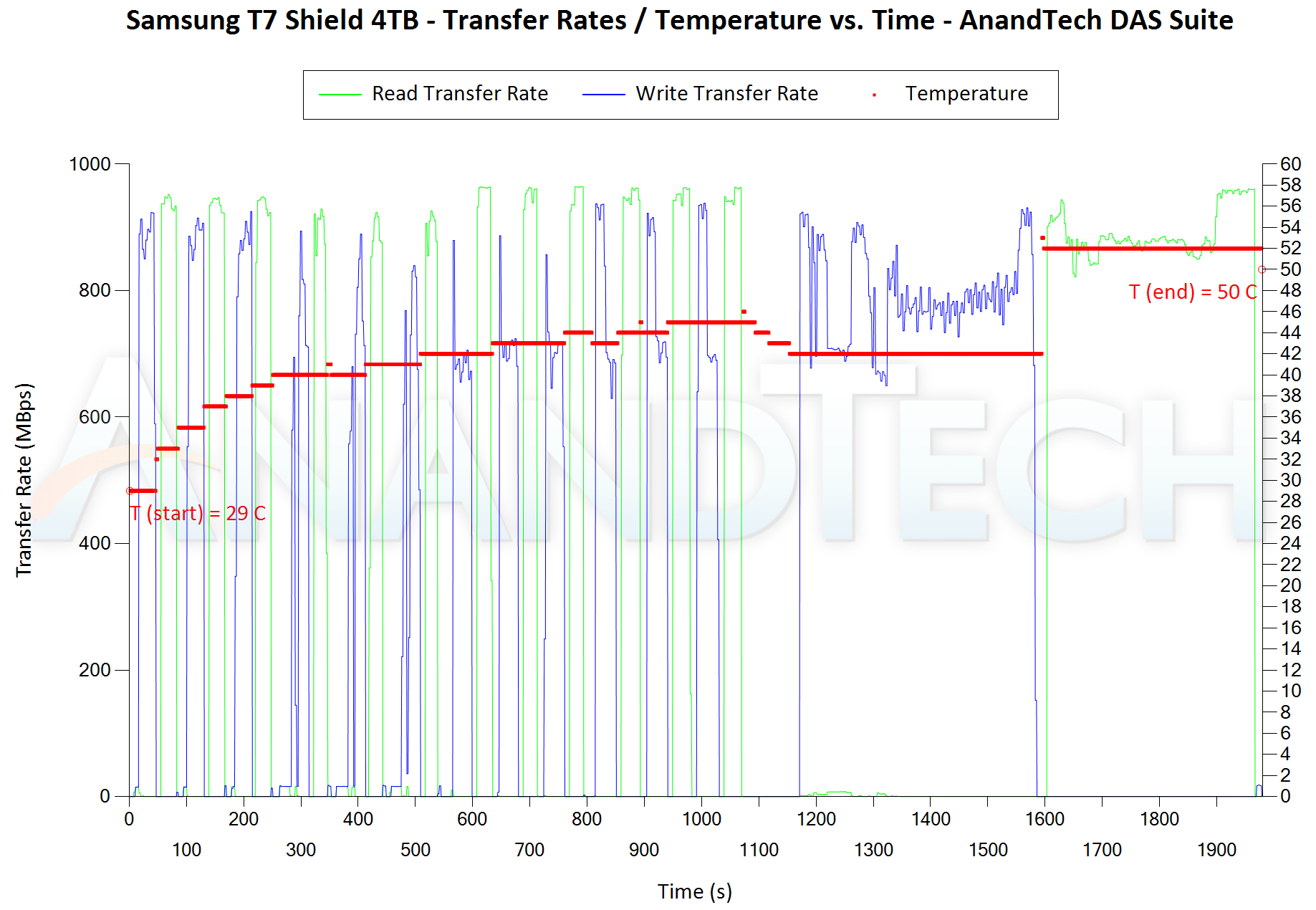
The first three sets of writes and reads correspond to the AV suite. A small gap (for the transfer of the video suite from the internal SSD to the RAM drive) is followed by three sets for the Home suite. Another small RAM-drive transfer gap is followed by three sets for the Blu-ray folder. This is followed up with the large-sized ISO files set. Finally, we have the single disk-to-disk transfer set. Sustained write pressure in the last component causes thermal throttling to be hit (at the end of the writes, the temperature is 76C), but the reduction in the speed of the succeeding reads from 1.5 GBps to around 1 GBps helps in bringing the temperature down to 65C. It does appear that the EliteX-PRO could do with some more attention to the thermal design.
There are a number of storage benchmarks that can subject a device to artificial access traces by varying the mix of reads and writes, the access block sizes, and the queue depth / number of outstanding data requests. We saw results from two popular ones – ATTO, and CrystalDiskMark – in a previous section. More serious benchmarks, however, actually replicate access traces from real-world workloads to determine the suitability of a particular device for a particular workload. Real-world access traces may be used for simulating the behavior of computing activities that are limited by storage performance. Examples include booting an operating system or loading a particular game from the disk. We use PCMark 10’s storage bench to evaluate PSSD performance in these types of scenarios.
Booting Windows 10
The read-write bandwidth recorded for each drive in the boo access trace is presented below.
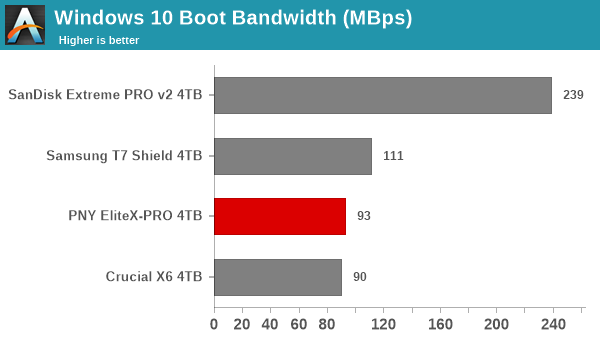
The bridge-based solutions take the lead here, with even the Gen 2 T7 Shield posting better numbers compared to the Gen 2×2 EliteX-PRO. Small random reads are better handled by a proper NVMe SSD controller rather than a native UFD controller.
Creative Workloads
The read-write bandwidth recorded for each drive in the sacr, saft, sill, spre, slig, sps, aft, exc, ill, ind, psh, and psl access traces are presented below.
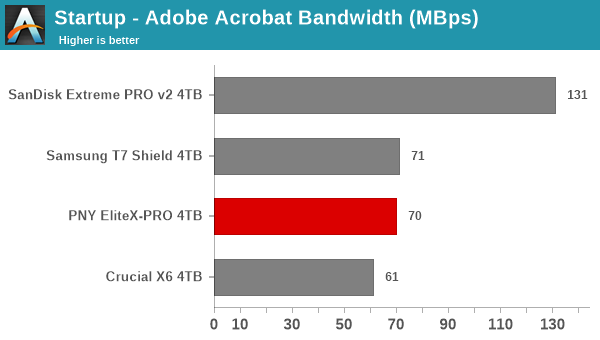
All the creative workloads see the EliteX-PRO come in either in the second or the third place. The bridge-based solutions can handle these better, but the Gen 2×2 capabilities give the PNY unit a bit of an edge over the Gen 2 T7 Shield in a few of the components.
Office Workloads
The read-write bandwidth recorded for each drive in the exc and pow access traces are presented below.
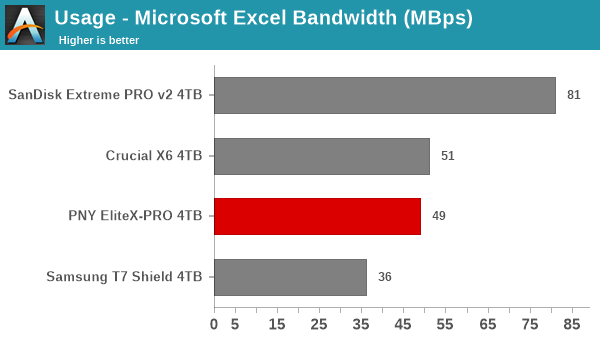
The observations made in the creative workloads sub-section above hold ture for the office workloads also. Native UFD controllers are held back in the random access performance because of the lack of DRAM, but the Gen 2×2 capabilities can sometimes give it the edge over Gen 2 bridge-based solutions like the T7 Shield.
Gaming Workloads
The read-write bandwidth recorded for each drive in the bf, cod, and ow access traces are presented below.
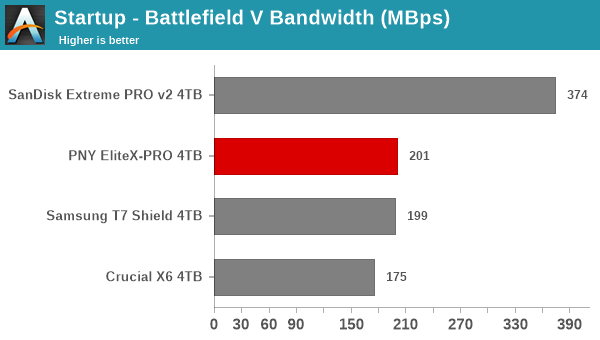
Gaming workloads are most large sequential reads with a few random accesses thrown in. It is no surprise then that the Gen 2×2 capabilities give the EliteX-PRO a slight edge over the Gen 2 T7 Shield. The SanDisk PSSD is the clear winner, though – thanks to its Gen 2×2 bridge chip.
Files Transfer Workloads
The read-write bandwidth recorded for each drive in the cp1, cp2, cp3, cps1, cps2, and cps3 access traces are presented below.
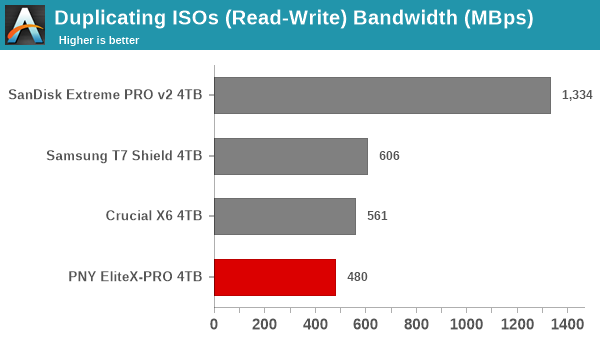
The EliteX-PRO starts off well by slotting in second (below the SanDisk Extreme PRO v2) in the ISO read component. However, the transfer rates soon start to suffer due to thermal throttling. This causes it to go below the Gen 2 T7 Shield in almost all of the other components.
Overall Scores
PCMark 10 reports an overall score based on the observed bandwidth and access times for the full workload set. The score, bandwidth, and average access latency for each of the drives are presented below.
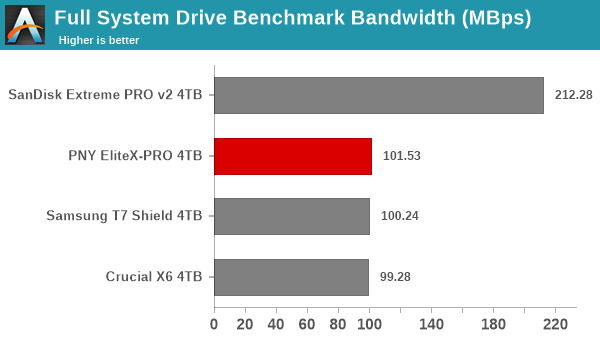
The bandwidth numbers are excellent for the EliteX-PRO despite the use of a DRAM-less native UFD controller. However, these suffer from random access performance issues, causing latencies to be much higher than bridge-based solutions. As a result, the slight edge in the bandwidth graph is not enough to prevent the PSSD from slipping to the third place behind the two bridge-based solution in the full system drive benchmark score.
The performance of the PNY Pro Elite V2 and the EliteX-PRO in various real-world access traces as well as synthetic workloads was brought out in the preceding sections. We also looked at the performance consistency for these cases. Power users may also be interested in performance consistency under worst-case conditions, as well as drive power consumption. The latter is also important when used with battery powered devices such as notebooks and smartphones. Pricing is also an important aspect. We analyze each of these in detail below.
Worst-Case Performance Consistency
Flash-based storage devices tend to slow down in unpredictable ways when subject to a large number of small-sized random writes. Many benchmarks use that scheme to pre-condition devices prior to the actual testing in order to get a worst-case representative number. Fortunately, such workloads are uncommon for direct-attached storage devices, where workloads are largely sequential in nature. Use of SLC caching as well as firmware caps to prevent overheating may cause drop in write speeds when a flash-based DAS device is subject to sustained sequential writes.
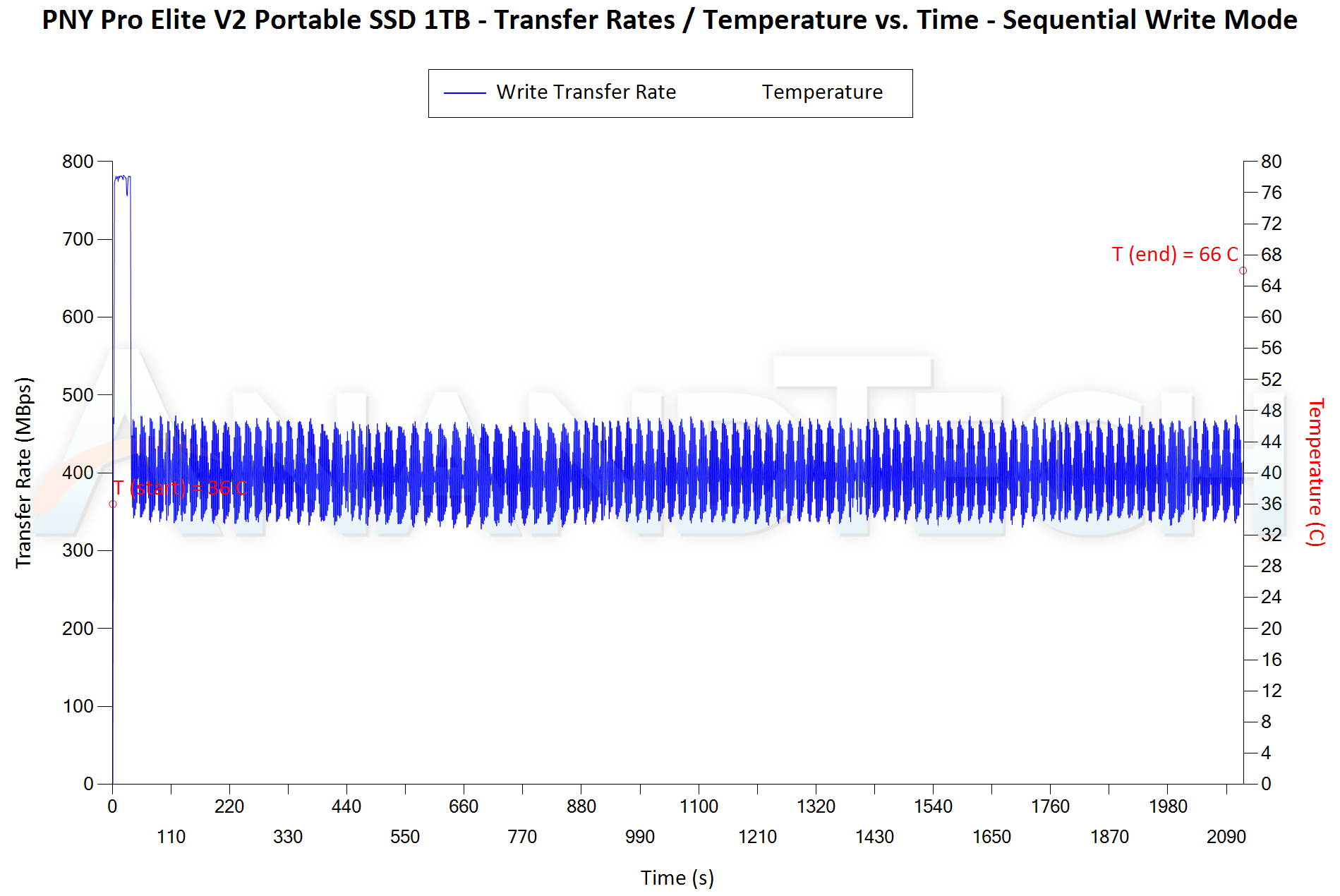
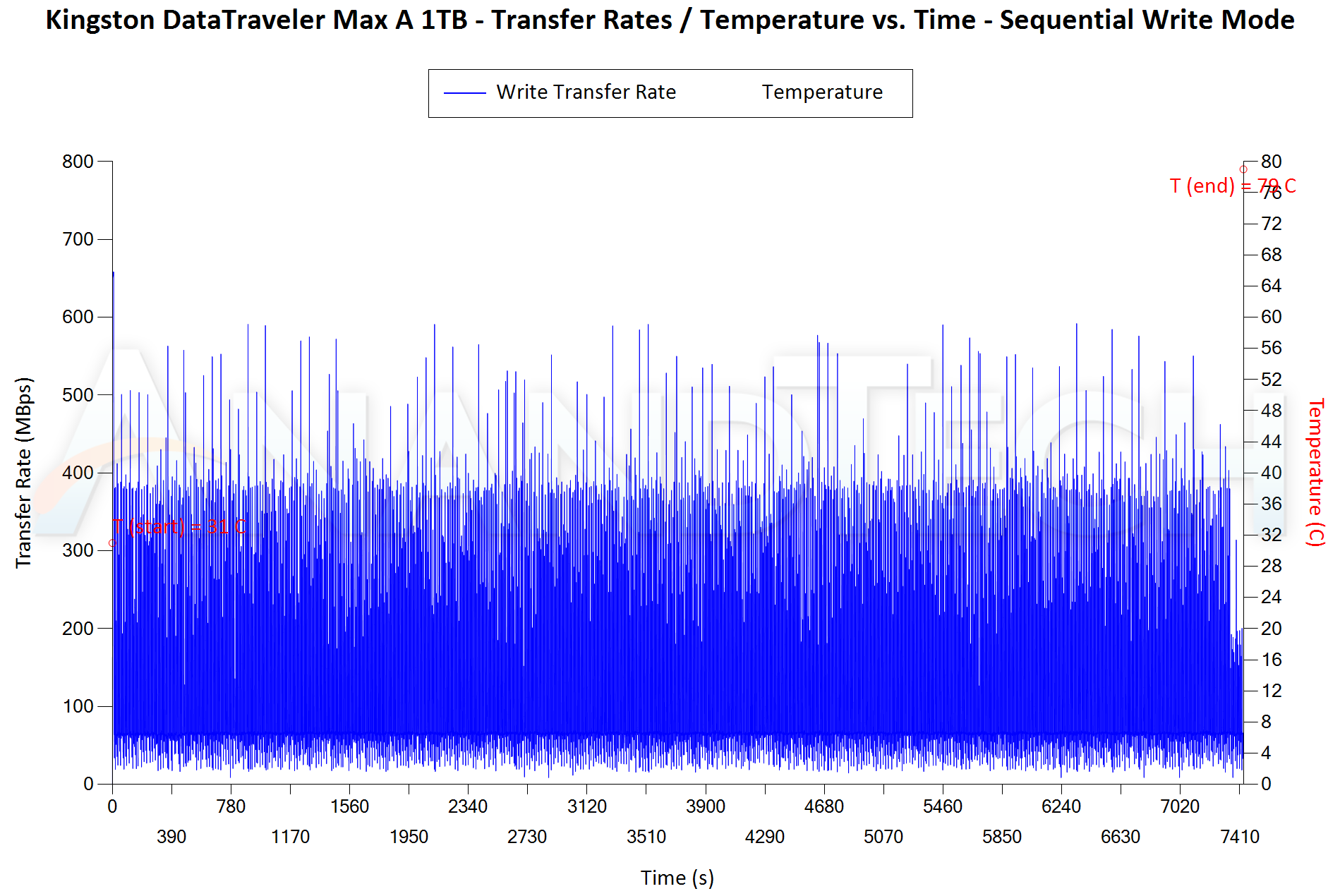
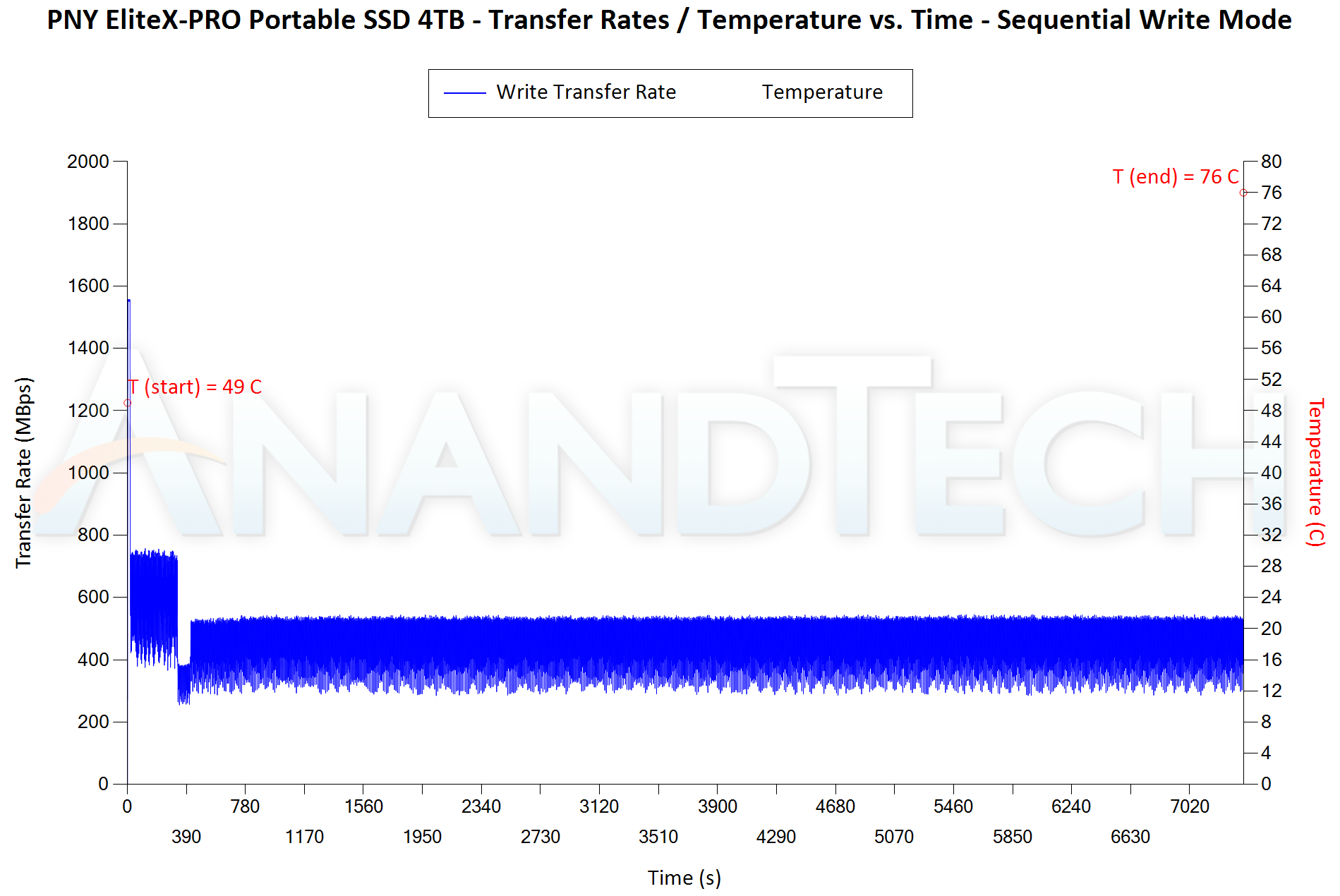
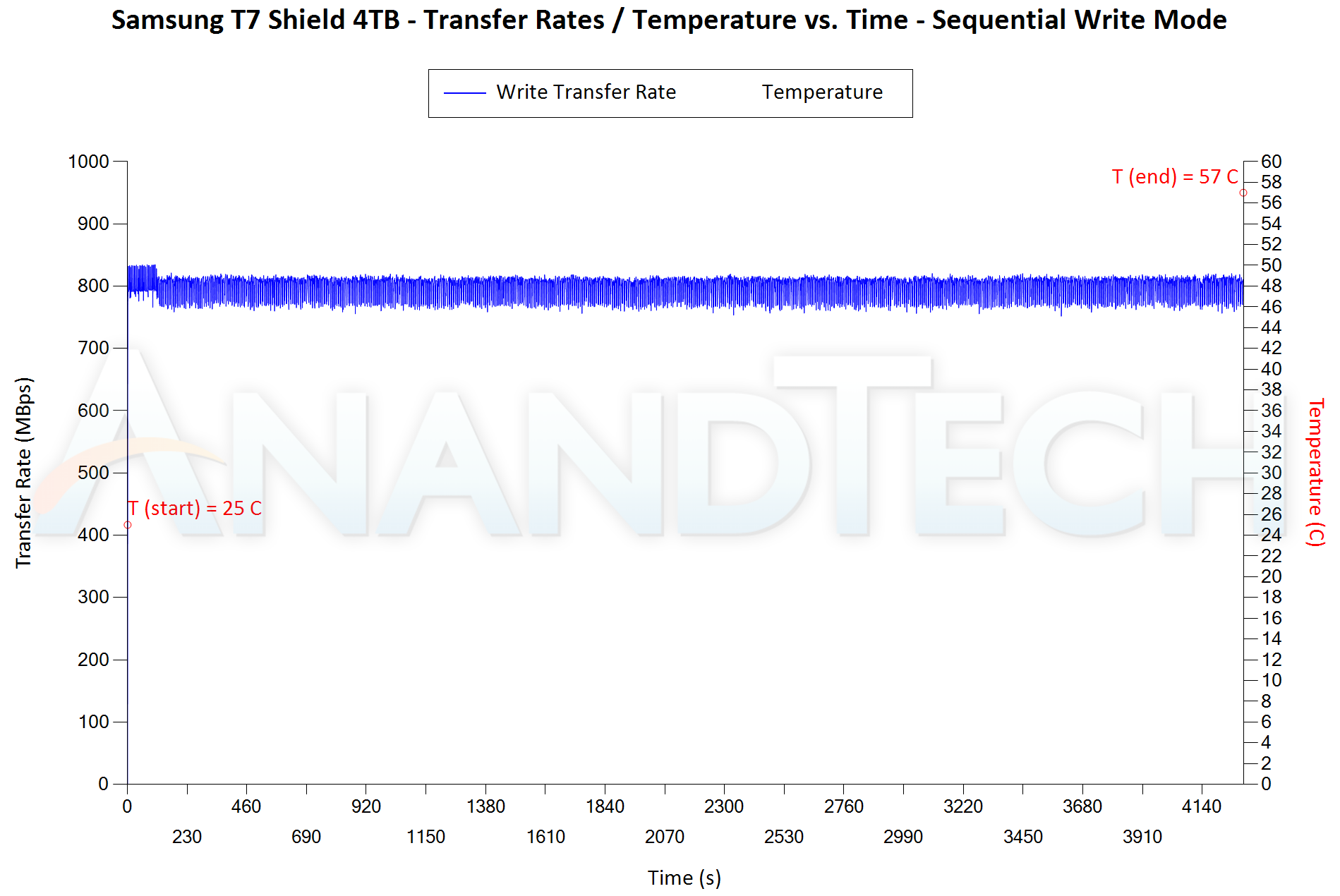
Our Sequential Writes Performance Consistency Test configures the device as a raw physical disk (after deleting configured volumes). A fio workload is set up to write sequential data to the raw drive with a block size of 128K and iodepth of 32 to cover 90% of the drive capacity. The internal temperature is recorded at either end of the workload, while the instantaneous write data rate and cumulative total write data amount are recorded at 1-second intervals.
| Sequential Writes to 90% Capacity – Performance Consistency [ 1 TB PSSDs] | |
| TOP: | BOTTOM: |
 |
|
 |
|
The Pro Elite V2 can sustain around 400 MBps after its SLC cache of around 25 GB gets exhausted. The behavior is much better than the OWC Envoy Pro Mini based on the same controller. Bridge-based solutions are obviously better, but the two U17 PSSDs perform better in this test compared to the SM2320-based ones. The temperature at the end of the process is 66C. Many other PSSDs are cooler at the end of this test, but they contain proper thermal solutions.
| Sequential Writes to 90% Capacity – Performance Consistency [ 4 TB PSSDs ] | |
| TOP: | BOTTOM: |
 |
|
 |
|
The absence of a proper thermal solution is a hindrance to the EliteX-PRO in this test. The Gen 2×2 PSSD can sustain only 300 MBps, and the 25 GB SLC cache runs out in as little as 17s due to the 1550 MBps initial fill-up. It is unclear why the SLC cache is sized this way for a 4 TB drive. The temperature is also a toasty 76C at the end of the process. The SanDisk PSSD with its stellar thermal solution is the star of the show in this workload.
Power Consumption
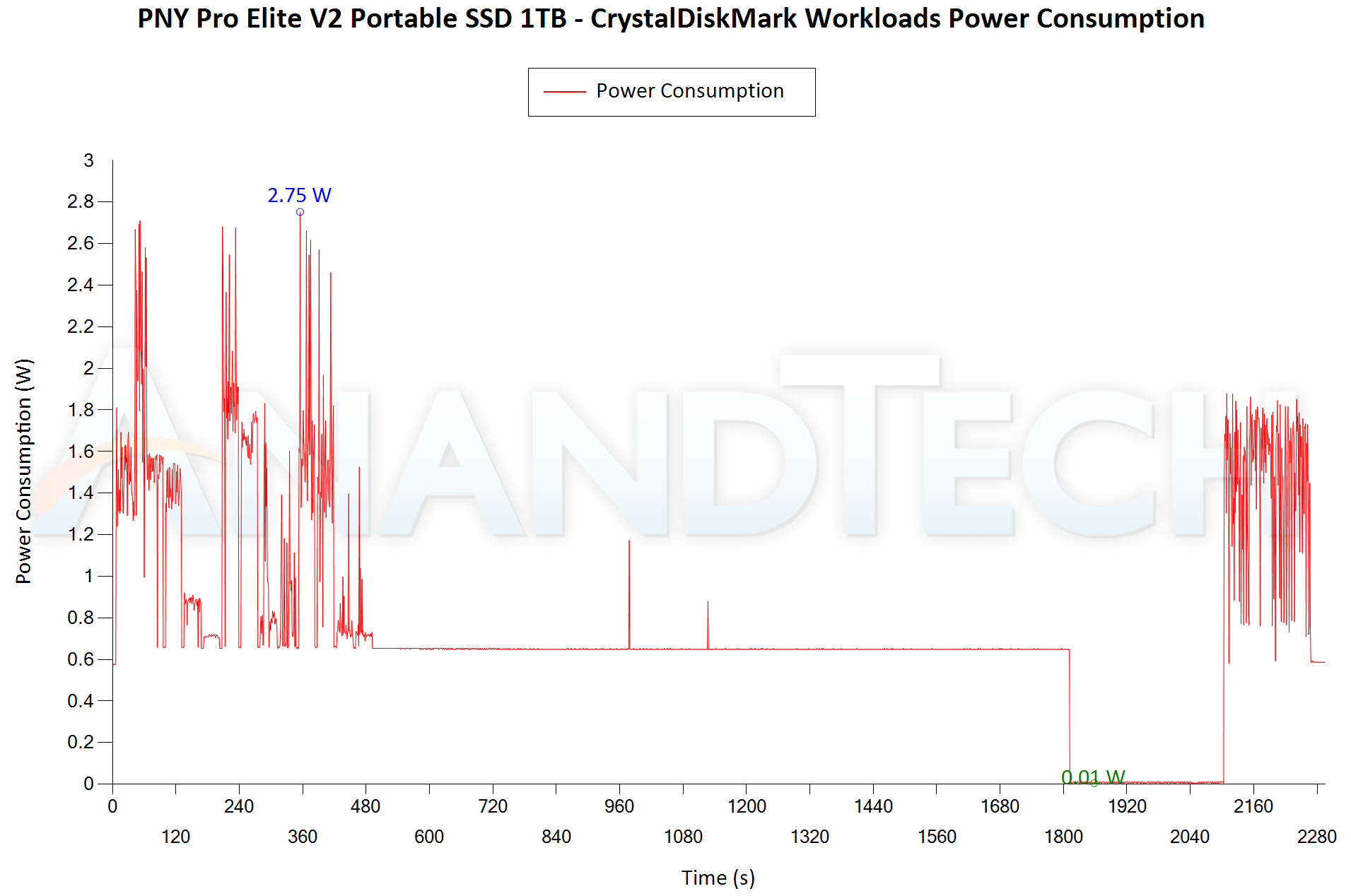
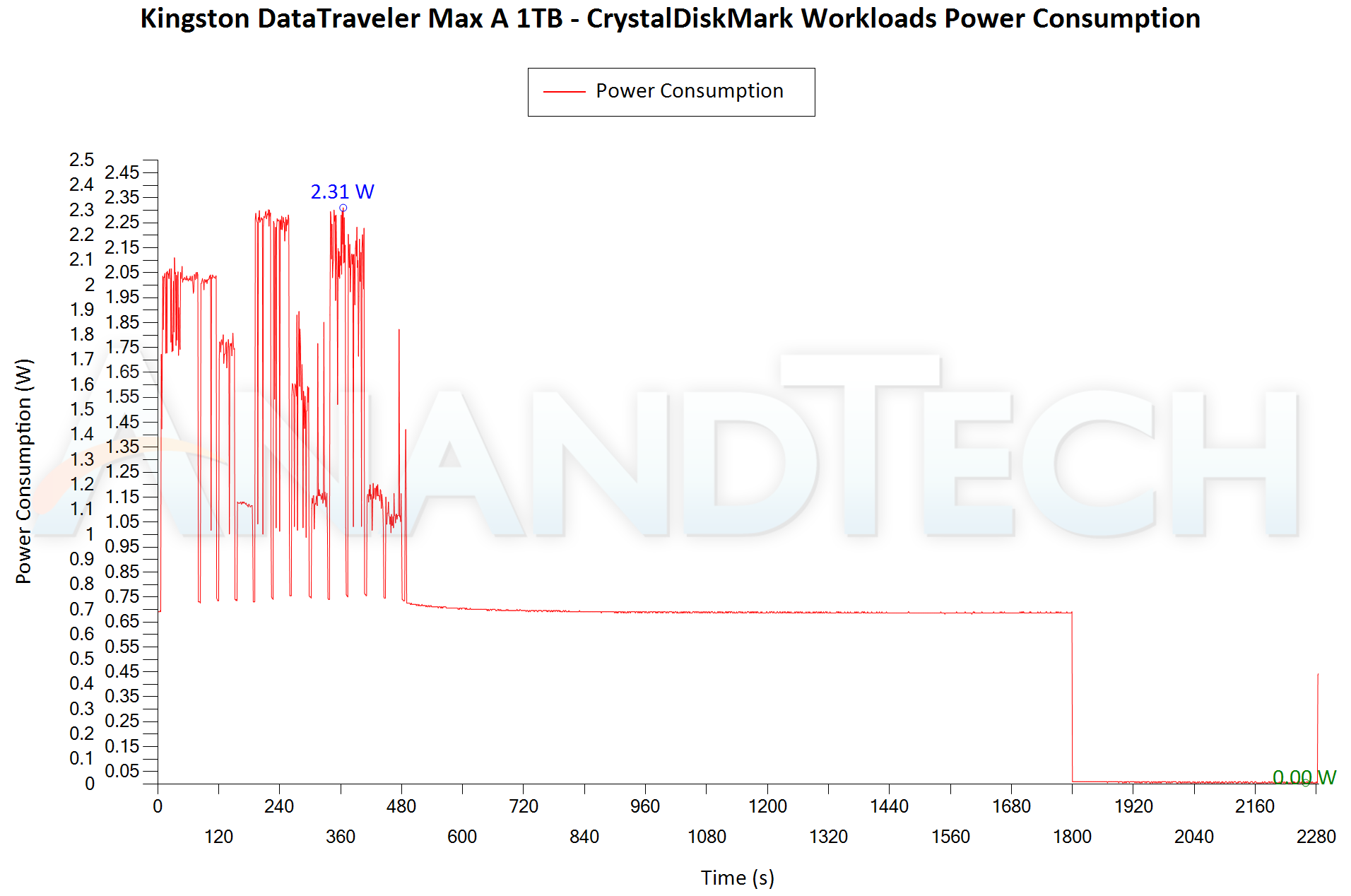
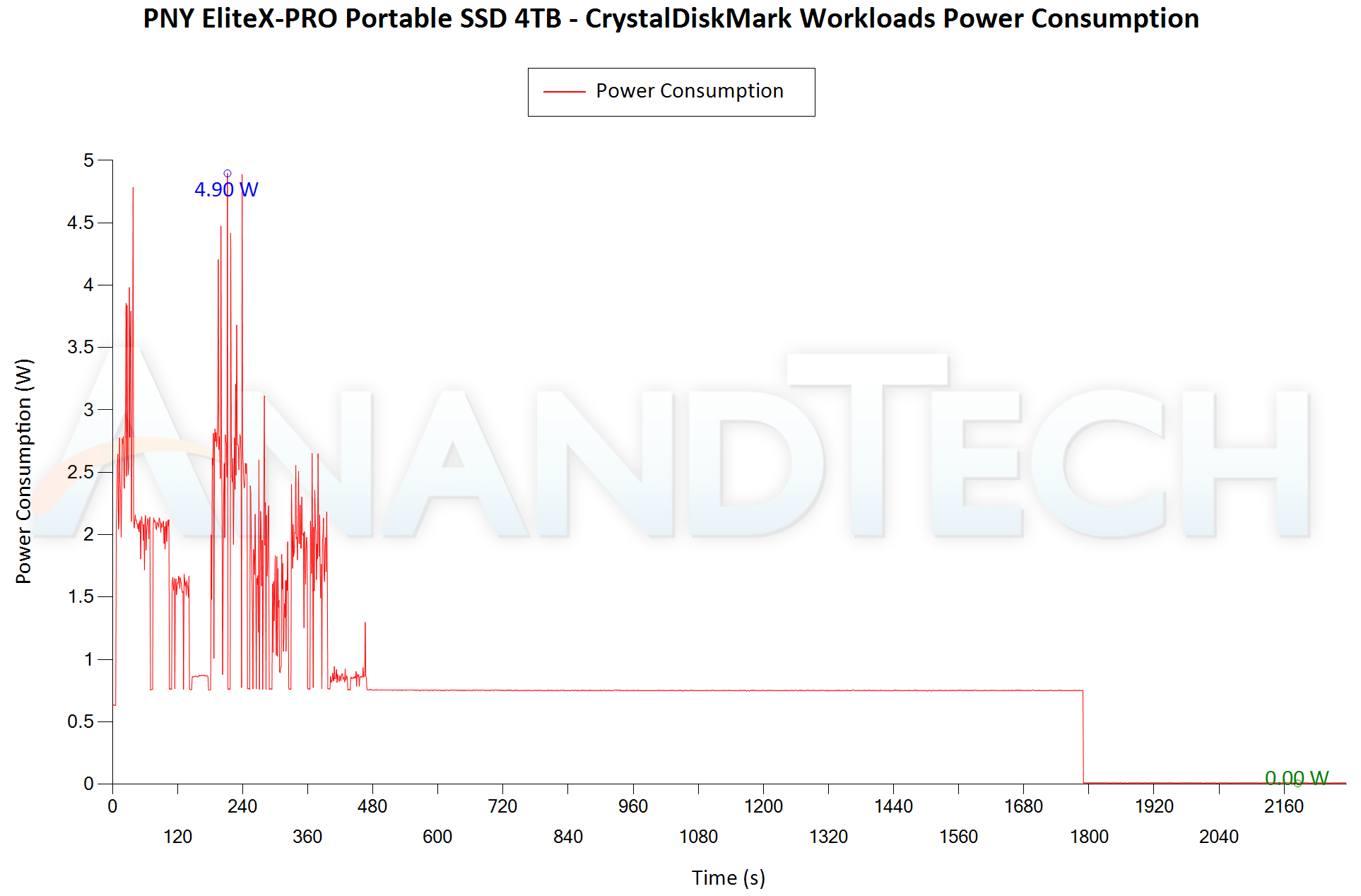
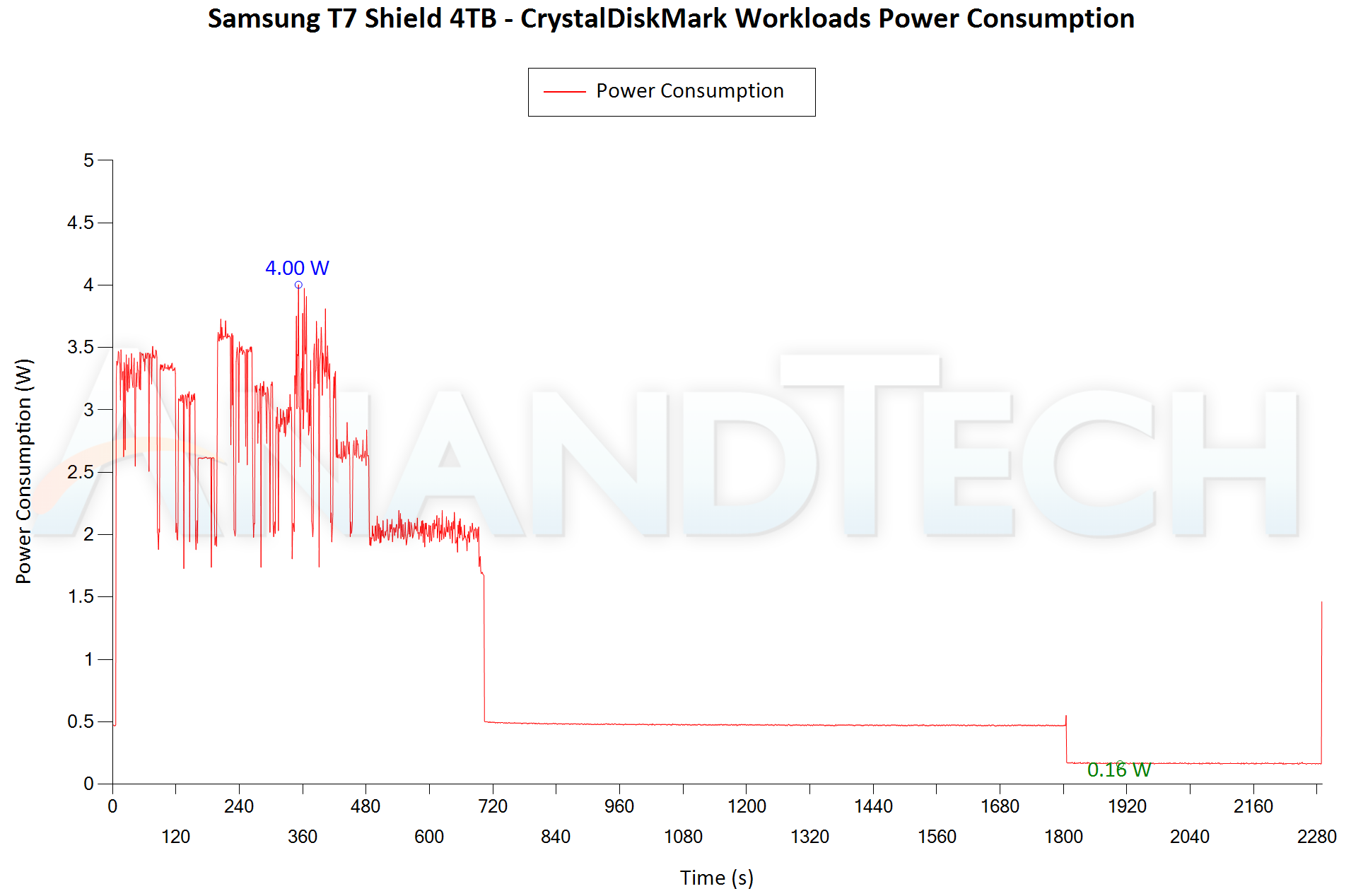
Bus-powered devices can configure themselves to operate within the power delivery constraints of the host port. While Thunderbolt ports are guaranteed to supply up to 15W for client devices, USB 2.0 ports are guaranteed to deliver only 4.5W (900mA @ 5V). In this context, it is interesting to have a fine-grained look at the power consumption profile of the various external drives. Using the Plugable USBC-TKEY, the bus power consumption of the drives was tracked while processing the CrystalDiskMark workloads (separated by 5s intervals). The graphs below plot the instantaneous bus power consumption against time, while singling out the maximum and minimum power consumption numbers.
| CrystalDiskMark Workloads – Power Consumption [ 1 TB PSSDs ] | |
| TOP: | BOTTOM: |
 |
|
 |
|
The bridge-based solutions consume more power than the native UFD controller ones, as expected. The OWC Envoy Pro Mini is the best of the lot, peaking at just 1.83W, while the PNY Pro Elite V2 clocks in at 2.75W. The good aspect is that the PSSD enters a deep sleep 0W power consumption state after around 20 minutes of idling. There is some garbage collection in the idle period that causes the drive to burn power when it is not expected to.
| CrystalDiskMark Workloads – Power Consumption [ 4 TB PSSDs ] | |
| TOP: | BOTTOM: |
 |
|
 |
|
Unlike the bridge-based solutions, the EliteX-PRO can hit a true zero deep sleep state. Peak power consumption is 4.9W, but that is way lower than the 7.23W of the SanDisk Extreme Pro V2. This is only to be expected given the presence of four flash packages as well as the high speeds (1550 MBps) to the external host. Samsung’s T7 Shield possesses a comprehensive thermal solution despite its peak power consumption being only 4W. PNY needs to equip the EliteX-PRO with additional support to handle the heat output.
Final Words
The PNY Pro Elite V2 and EliteX-PRO have been available in the market for a few months now. The 1 TB version of the Pro Elite V2 has a current street price of $70, while the 4 TB version of the EliteX-PRO is available for $300. At the Pro Elite V2’s current price point, the main competition is the Transcend ESD310C. However, the two products target different market segments / consumer types. There is not much to complain on that front. The EliteX-PRO’s pricing analysis is not quite that straightforward. The 4 TB T7 Shield is priced at $260, but it is a Gen 2 device. The SanDisk Extreme PRO v2 is also priced at $300, and has a much better performance profile and stands up well to sustained stress. However, the EliteX-PRO consumes much less power. On balance, the EliteX-PRO can be said to provide value only if it is priced lower than the SanDisk Extreme PRO v2.
Phison’s native UFD controllers have been a bit of a mixed bag so far. Not being able to hit the interface speed limits and small SLC cache sizes (that is arguably an important aspect for direct-attached storage workloads) are some of the complaints that any reasonable user might want to file. Bridge-based solutions, despite their higher power consumption numbers, offer much better value. OWC was able to work around these problems in the Envoy Pro Mini by careful firmware tuning and creating a unique product in a thumb drive form factor. Unfortunately, the same can’t be said of PNY’s offerings. While the Pro Elite V2 offers compelling all-round value at $70, low-power operation is the only advantage for the EliteX-PRO. Consumers looking for a 4 TB off-the-shelf high-speed PSSD are better off with the SanDisk Extreme PRO v2 (or even the T7 Shield if 10 Gbps / Gen 2 speeds are enough).