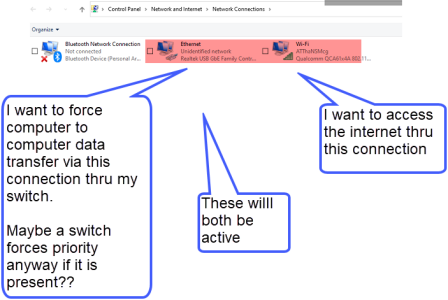
How do I force the computers to “talk to each other” using the LAN/switch, BUT access the internet using their own Wi-Fi connection to my central router that is broadcasting the Wi-Fi signal?
It seems that I have 2 networks when I look in my Win 11 settings – one for the switched LAN, and the other being the Wi-Fi network. How do I make sure that the computer to computer connection is thru the switch, and not the Wi-Fi, but still get internet access via the broadcast wireless signal?
I am concerned that the computer to computer data transfer/folder sharing et, are connecting thu the Wi-Fi even though I have the switch. I want to prevent that use of the wifi for the file sharing..
The reason I want to do this is because if the computers use the Wi-Fi network to share files, the transfer and processing rates are very slow. Thus the switch for speed. The computers need internet access on a sporadic basis, but need the computer-to-computer data transfer operations to happen “all the time”.
Want to force use of switch for computer to computer folder sharing, but use the Wi-Fi for internet.
Advice?
Sorry for my bad use of terms, but I hope you get the idea.